






We’ve all heard the mantra that the subject line is the sole gatekeeper of your email engagement, leading many brands to obsess over a few words while completely ignoring the secondary real estate right beneath it. But what if this narrow focus is actually leaving massive amounts of money on the table by failing to convert the 42 percent of recipients who look at the sender and preview details before ever committing to an open? For high-growth eCommerce businesses, the hidden cost of inaction lies in treating preview text as an afterthought or a technical default, which acts as a silent ceiling on your click-through rates and overall revenue expansion.
The hard reality is that in a crowded inbox, your preview text is the final high-leverage opportunity to trigger customer intent and maximize Customer Lifetime Value (LTV) before a user scrolls past your message. Transitioning from generic, auto-generated snippets to a strategically controlled preview strategy is a technical necessity for any brand aiming to eliminate deliverability friction and drive scalable growth. This guide breaks down the essential FAQs of email preview text, providing the data-driven logic you need to master this vital inbox space and ensure your automated workflows are performing at their absolute peak.
What is email preview text?
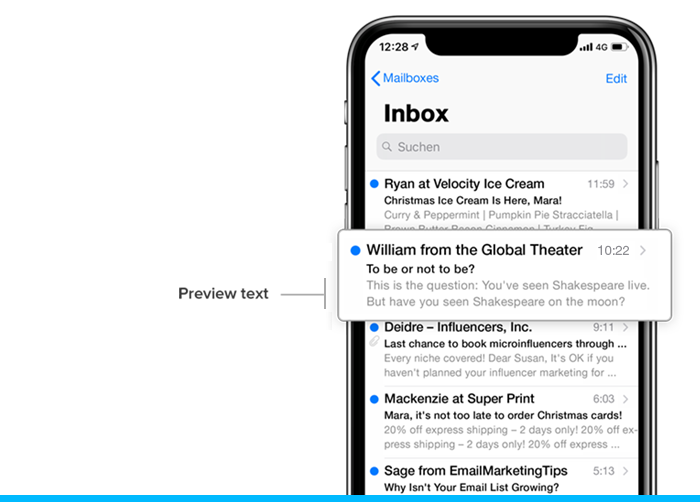
Email preview text is the snippet of copy that appears directly after or below the subject line in an inbox. For WooCommerce store owners, this real estate is a high-leverage opportunity to provide context and drive clicks before a recipient even opens the message. By default, email clients like Gmail and Outlook will pull the first line of text found in the email body, which often results in generic and unprofessional “View in browser” or “Dear Customer” snippets that fail to convert.
- The Teaser: Preview text acts as a secondary subject line, allowing you to elaborate on a promotional offer or transactional update without cluttering the primary header.
- Programmatic Control: Modern email marketing platforms allow you to set a custom hidden preheader, ensuring you control exactly what characters appear in the inbox view rather than leaving it to the email client’s default scraping.
- Conversion Lever: Strategic use of this space can significantly reduce the “silent ceiling” on open rates by addressing customer pain points or building urgency at the exact moment of discovery.
In a high-growth eCommerce environment, ignoring preview text is a technical oversight that directly destróis campaign ROI. To maximize visibility, merchants should treat this field as an essential component of the message envelope, ensuring it complements the subject line to create a cohesive and compelling invitation to engage with the brand’s content.
Why is preview text important for eCommerce open rates?
In the highly competitive landscape of eCommerce, the inbox is a battleground where milliseconds determine whether a customer engages or scrolls past. Preview text serves as the secondary subject line, providing a critical opportunity to expand on your hook and provide technical context that the subject line might lack. For WooCommerce store owners, failing to define this space often results in the email client pulling “junk” text—like “View in browser” or “Unsubscribe”—which creates a visual disconnect and destróis the professional authority of your brand.
Strategic use of preview text directly influences open rates by addressing specific customer motivations and reducing the psychological friction of opening an unknown message. To maximize performance, consider the following technical advantages:
- Contextual Continuity: Use the preview text to finish the thought started in the subject line, creating a cohesive narrative that drives curiosity or urgency.
- Mobile Optimization: Since mobile clients display preview text prominently, it acts as a primary decision-making factor for users on the go, often appearing more visible than the subject line itself.
- Incentive Reinforcement: This real estate is perfect for highlighting specific WooCommerce triggers, such as unique coupon codes, free shipping thresholds, or the end-date of a flash sale.
Ultimately, the preview text is your final chance to secure a click before a user commits to an action. By treating this space as a strategic asset rather than an afterthought, you ensure that your transactional and marketing flows maintain the high engagement levels necessary for sustained revenue growth and customer retention.
What is the difference between preview text and preheader text?
While the terms are often used interchangeably in marketing discussions, a technical distinction exists between preview text and preheader text that high-growth WooCommerce brands must understand to optimize their inbox presence. The preheader is the actual first line of text found within the email body, often appearing above the header or logo, whereas preview text is the specific snippet displayed in the recipient’s inbox view immediately following the subject line. Modern email marketing tools allow you to customize the preview text independently of the visible content, ensuring that technical links like “View in Browser” do not clutter the subscriber’s first impression.
- Preview Text: This is a feature of the email client interface (like Gmail or Outlook) designed to give users a peek into the message content before they click to open.
- Preheader Text: This is an element of the email’s HTML code. If no specific preview text is defined in your software, the email client will default to pulling this text from the very top of your email body to fill the preview space.
For a competitive eCommerce strategy, the goal is to bridge these two elements by utilizing a “hidden preheader.” This involves inserting specific text into your email’s code that is invisible within the message body but is prioritized by the inbox as the preview text. This programmatic approach allows you to craft a compelling secondary subject line that drives urgency or highlights a specific offer without sacrificing the aesthetic integrity of your WooCommerce email design.
How to optimize email preview text for WooCommerce?
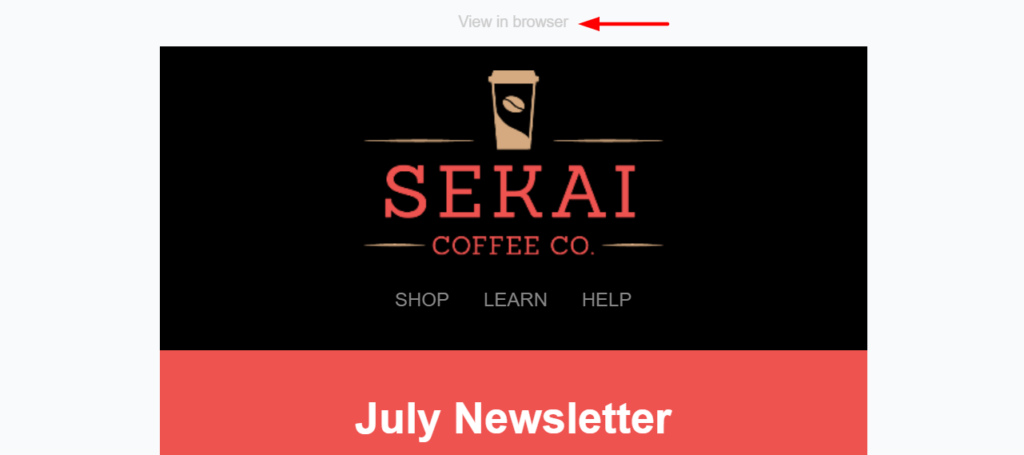
Optimizing email preview text for WooCommerce requires a strategic approach that treats this snippet as a secondary subject line. For high-growth stores, the goal is to bridge the gap between the curiosity sparked by the subject line and the technical reality of the inbox. By intentionally crafting this text, you prevent email clients from pulling in generic “view in browser” links or navigation menu fragments, which can dilute your message and lower click-through rates.
- The Curiosity Gap: Use the preview text to elaborate on a promise made in the subject line without repeating it. If your subject is “Your cart is waiting,” the preview text should provide a specific incentive like “Complete your order now to unlock free shipping on these items.”
- Character Count Precision: Aim for 40 to 90 characters to ensure visibility across both mobile and desktop clients. Mobile users, who represent a significant portion of WooCommerce traffic, often see more preview text than desktop users, making the first 40 characters critical for engagement.
- Dynamic Personalization: Leverage WooCommerce customer data to include dynamic fields such as the customer’s first name or the specific product they abandoned. This technical tailoring signals relevance and can significantly move the needle on Customer Lifetime Value (LTV).
Beyond the copy itself, ensuring your technical infrastructure supports custom preheaders is vital for maintaining brand authority. When you control this real estate, you effectively eliminate the “silent ceiling” on your open rates caused by poor inbox presentation. By transforming this brief teaser into an urgent, value-driven extension of your brand voice, you maximize the opportunity to convert passive scrollers into active shoppers before they ever leave their inbox.
How do I add custom preview text in my email marketing software?
Most modern email service providers (ESPs) simplify the process of adding custom preview text by providing a dedicated input field within the campaign builder, usually located directly beneath or alongside the subject line field. For WooCommerce store owners, utilizing these built-in fields is the most efficient way to ensure your marketing hooks and promotional offers are immediately visible in the inbox without requiring deep technical intervention.
- Standard Builder Method: Access your campaign’s “Subject” or “Setup” section and enter your desired snippet into the field labeled “Preview Text” or “Preheader.” This automatically injects the necessary hidden code into the email header.
- Custom HTML Method: If your software lacks a dedicated field, you can manually insert a hidden div tag immediately after the opening body tag using CSS styles like display:none; to ensure it remains invisible within the actual email body.
- Personalization Tags: Leverage your platform’s merge tags within the preview field to dynamically insert customer names or recent purchase data, further increasing the relevance and CTR of your outreach.
Before finalizing any campaign, it is critical to use a testing tool or send a preview to multiple devices to verify how the snippet renders. Since character limits vary across clients like Gmail and Outlook, placing your most compelling value proposition at the very beginning of the preview text ensures your message isn’t cut off before it can drive an open.

Ready to take your e-commerce to the next level?
While mastering the technical nuances of email preview text is a critical lever for improving open rates, the broader business reality for high-growth WooCommerce brands is that surface-level optimizations often mask deeper structural inefficiencies. If your retention efforts feel like they are stalling revenue expansion, or if you suspect your high open rates are failing to translate into meaningful LTV growth, you are likely facing a breakdown in how your automation and customer data synchronize. Relying on basic tactics without a cohesive strategy for the entire lifecycle is not just a missed opportunity; it is a direct compromise of your brand’s scalability and bottom-line profitability.
To move beyond vanity metrics and build a high-performance growth engine, you need a partner that treats your technical backend as a strategic asset. We act as a professional extension of your in-house team, helping DTC brands maximize profit through data-driven systems where CRM, advanced tracking, and marketing automation operate in perfect concert. Our process begins with rigorous, conversion-focused audits designed to eliminate guesswork and identify the exact bottlenecks in your customer journey. If you are ready to transition from manual campaign management to a scalable, automated system that maximizes ROAS, book a free marketing automation audit today.