





Many eCommerce brands operate under the comforting illusion that a high-volume email strategy is the only engine required for sustainable revenue expansion, believing that as long as the inbox is reached, the customer is won. But what if this narrow focus on a single channel is actually acting as a silent ceiling on your growth and causing you to leave massive amounts of money on the table? The hidden cost of inaction in diversifying your conversational touchpoints is the erosion of Customer Lifetime Value (LTV), as modern consumers increasingly shift their attention away from cluttered email folders toward the high-velocity engagement of mobile messaging.
The hard reality is that with over 2 billion active users, WhatsApp has transcended its origins as a personal chat tool to become a strategic necessity for high-growth brands aiming to capture peak customer intent. Relying on legacy communication frameworks while ignoring the immediate open rates of a direct mobile channel is a recipe for stagnant ROI and lost conversions. This guide breaks down the critical technical differences between personal accounts, WhatsApp Business, and the WhatsApp Business API, providing the data-driven logic you need to integrate the right infrastructure and fuel a truly scalable multi-channel marketing strategy.
What is the difference between WhatsApp and WhatsApp Business?
The primary distinction between standard WhatsApp and its business-oriented counterparts lies in the shift from private, peer-to-peer communication to a structured commercial infrastructure. While the personal app is designed for informal messaging with friends and family, the business versions provide the essential framework for professional branding, automated workflows, and high-volume customer engagement that a standard personal account cannot sustain without risking compliance violations or account bans.
- WhatsApp (Personal): A consumer-grade tool for one-to-one communication with no automation, limited broadcast capabilities, and no professional profile features.
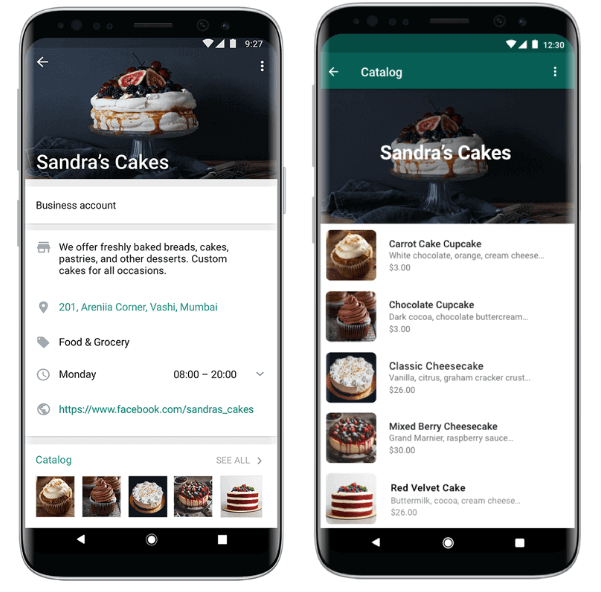
- WhatsApp Business App: A free solution for small businesses that introduces basic automation like away messages, a product catalog, and labels for organizing customer conversations.
- WhatsApp Business Platform (API): An enterprise-grade interface built for medium to large brands, enabling programmatic integration with WooCommerce, multi-agent support, and massive scalability via automated marketing and transactional flows.
For a growing WooCommerce store, the choice between these options directly impacts your ability to scale revenue. While the Business App provides a visible storefront for local operations, the Platform API is the only solution that allows you to bypass manual limitations, ensuring your transactional alerts and marketing campaigns are delivered through a verified, high-performance channel that protects your brand authority and customer trust.

Why should I use WhatsApp Business for my eCommerce store?
For high-growth WooCommerce stores, the shift from email to WhatsApp Business is driven by the platform’s ability to eliminate friction throughout the customer lifecycle. While email open rates typically hover between 17% and 28%, WhatsApp delivers up to 98% open rates, ensuring that mission-critical notifications and promotional offers are seen within minutes. By utilizing a dedicated business profile, you move beyond simple messaging to a structured commercial environment that builds brand legitimacy and professional trust.
- Streamlined Product Discovery: Use the native catalog feature to showcase your products directly within the app, allowing users to browse and add items to their cart without navigating away from the conversation.
- Superior Engagement Metrics: Achieve click-through rates of 45% to 60%, significantly outperforming traditional channels and driving a higher volume of attributed conversions from your mobile-first audience.
- High-Intent Automation: Implement interactive messaging options like quick-reply buttons and list messages to guide customers through support queries or purchase decisions with minimal technical overhead.
From a strategic standpoint, WhatsApp Business allows you to bridge the gap between marketing and operations. Integrating this tool into your WooCommerce workflow enables real-time transactional transparency, such as instant order confirmations and automated shipping updates. This immediate feedback loop reduces customer anxiety, lowers the volume of support tickets, and creates a conversational buying experience that naturally increases Customer Lifetime Value (LTV).
How to integrate WhatsApp Business API with WooCommerce?
Integrating the WhatsApp Business API into your WooCommerce store shifts your communication from a manual, phone-based workflow to a scalable, automated engine. Unlike the standard Business App, the API allows for deep integration with your store’s backend, enabling real-time triggers for order confirmations, shipping updates, and abandoned cart recovery. To execute this correctly, you must bridge the gap between Meta’s developer environment and your WordPress installation using either a dedicated plugin or a middleware automation platform.
- Meta Business Verification: You must first verify your legal business entity within the Meta Business Suite to unlock full API capabilities and higher messaging limits.
- API Credentials Configuration: Once your app is created in the Meta Developers portal, you will need to generate a permanent access token and retrieve your Phone Number ID and WhatsApp Business Account ID.
- Webhook and REST API Mapping: Connect your WooCommerce REST API keys to your integration tool to allow two-way data flow, ensuring that status changes in your dashboard instantly trigger the corresponding WhatsApp message template.
For high-growth stores, the most effective integration strategy involves leveraging official WhatsApp Business Solution Providers (BSPs) or automation tools like Albato or Onlizer. These platforms provide a visual interface to map WooCommerce data fields to WhatsApp message variables, eliminating the need for custom PHP development. This technical foundation ensures that mission-critical transactional data reaches your customers with millisecond latency, bypassing the delivery hurdles often associated with traditional email-based notifications.
What are the benefits of WhatsApp automation for revenue growth?
Integrating WhatsApp automation into a WooCommerce store transitions your communication from a passive support channel to a high-velocity revenue engine. By leveraging the 98% open rates inherent to the platform, automation removes the friction typically found in email-heavy workflows, ensuring that high-intent triggers—such as abandoned cart alerts or price drop notifications—are seen and acted upon in real-time. For high-growth brands, this speed directly correlates to higher conversion rates and a significant reduction in the sales cycle.
- Automated Cart Recovery: Send personalized reminders with direct checkout links to users who leave items in their cart, capturing lost revenue at the moment of highest intent.
- Behavioral Upselling: Trigger automated product recommendations based on specific purchase history or browsing data, increasing Average Order Value (AOV) through highly relevant cross-sells.
- Post-Purchase Retention: Automate delivery updates and review requests, building the immediate trust necessary to improve Customer Lifetime Value (LTV) and encourage repeat purchases.
Strategic automation also scales your operations without increasing headcount. By deploying AI-driven chatbots to handle repetitive transactional queries and lead qualification, your team can focus on high-value customer interactions. This infrastructure ensures that your store remains responsive 24/7, preventing potential revenue leakage during off-hours and providing the technical foundation required to support global expansion.
When should I upgrade to the WhatsApp Business Platform API?
For high-growth WooCommerce brands, the transition from the WhatsApp Business App to the WhatsApp Business Platform API is a technical necessity that arises when manual communication begins to stall revenue expansion. While the free app is an excellent entry point for solo entrepreneurs, it creates a structural ceiling for teams managing high message volumes or those requiring data integrity across their customer service stack. You should consider the upgrade when your operational overhead exceeds the capacity of a single mobile device and manual typing.
- Multi-Agent Requirements: If your team has grown beyond five members and requires a unified inbox with message assignment, internal notes, and performance tracking to maintain accountability.
- CRM and System Integration: When you need to sync WhatsApp conversations bidirectionally with tools like HubSpot, Salesforce, or your WooCommerce database to ensure a 360-degree view of the customer journey.
- Automated Scaling: If your inquiry volume necessitates AI-powered chatbots to resolve FAQs 24/7 or if you want to trigger automated transactional alerts—like order confirmations and shipping updates—via HTTP requests.
- Broadcast Limitations: When your marketing strategy requires reaching more than 256 contacts simultaneously without the restriction of recipients having your number saved in their address book.
Ultimately, the decision to upgrade is driven by the need for legal compliance and technical resilience. The API is the only solution that offers GDPR-compliant data handling and the ability to obtain the official “green checkmark” verification, which significantly increases open rates and brand trust during proactive outreach. If your manual workflows are causing latency in customer responses or eroding your Customer Lifetime Value, you have reached the technical limits of the consumer-grade app.
Ready to take your e-commerce to the next level?
While understanding the distinction between standard WhatsApp and its business-oriented counterparts is a vital technical first step, the business reality for high-growth WooCommerce brands is that a tool without a rigorous data strategy is merely a distraction from profitability. If your customer engagement efforts feel like they are stalling revenue expansion, or if you suspect your high open rates are failing to translate into meaningful increases in Customer Lifetime Value (LTV), you are likely facing a structural bottleneck in how your conversational channels integrate with your broader ecosystem. Relying on basic messaging without deep CRM synchronization and performance-led automation is a missed opportunity to capture high-intent revenue at the exact moment of peak engagement.
To move beyond basic communication and build a high-performance growth engine, you need a partner that treats WhatsApp not as a standalone app, but as a strategic component of a unified, data-driven system. We act as an extension of your in-house team, helping DTC brands maximize Profit and Retention by ensuring that tracking, automation, and lifecycle marketing operate in perfect concert. Our methodology eliminates guesswork through conversion-focused audits that identify the precise technical and strategic gaps in your customer journey. If you are ready to scale your WooCommerce store with privacy-compliant, high-ROI systems that maximize ROAS, book a free consultation today.