

We’ve all heard the mantra that email and SMS are the only owned channels capable of driving sustainable revenue expansion, leading many brands to overlook the high-intent traffic already browsing their site. But what if this narrow focus on traditional messaging is actually acting as a silent ceiling on your conversion rates? For high-growth eCommerce businesses, the hidden cost of inaction lies in the missed opportunities to engage visitors the moment they leave your store, effectively leaving massive amounts of money on the table by failing to utilize the immediacy and reach of browser-based communication.
The hard reality is that relying solely on inbox-dependent channels ignores the power of real-time visibility and millisecond latency that web push notifications provide. Transitioning to a sophisticated push strategy is not just a tactical addition; it is a strategic necessity to maximize Customer Lifetime Value (LTV) by capturing intent even when a user’s browser is closed. This guide breaks down 12 essential strategies to transform web notifications into a high-performance growth engine, ensuring your brand remains top-of-mind and every site visit becomes a driver for scalable revenue.
What are web push notifications and how do they work?
Web push notifications are brief, actionable messages delivered directly to a user’s desktop or mobile browser, serving as a powerful re-engagement tool for WooCommerce stores. Unlike email, these notifications do not require personal data like names or addresses; they rely on a permission-based token system established through the browser. This allows you to maintain a direct line of communication with your audience, bypassing crowded inboxes and reaching customers even when they are not actively browsing your website.
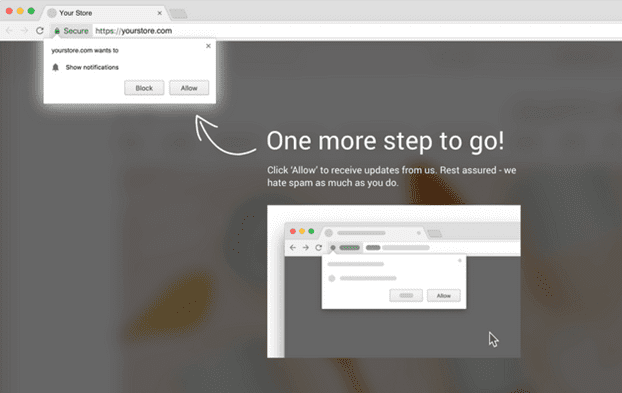
- The Opt-in: A visitor arrives at your store and is presented with a browser-level prompt requesting permission to send updates.
- The Subscription: Upon approval, the browser generates a unique, anonymous subscription token, which is stored by your push service provider to identify that specific device.
- The Delivery: When a trigger event occurs—such as a price drop or a restock—your server sends a request to a push service (like Google’s FCM), which then delivers the message to the user’s device in real-time.
For high-growth eCommerce brands, the technical advantage lies in the use of Service Workers. These scripts run in the background of the browser, enabling the delivery of notifications regardless of whether the specific website tab is open. This infrastructure ensures that mission-critical alerts, such as abandoned cart reminders or time-sensitive flash sales, achieve high visibility and immediate response rates, effectively driving consistent traffic back to your store without the friction of traditional lead capture.
Why should I use web notifications for WooCommerce growth?
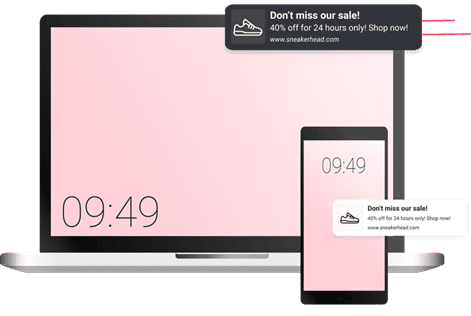
For high-growth WooCommerce stores, web notifications serve as a high-visibility communication channel that bypasses the friction of crowded email inboxes and the limitations of social media algorithms. By establishing a direct link to a user’s browser, you can deliver time-sensitive updates that command immediate attention, even when the visitor is not actively browsing your site. This capability is critical for reclaiming lost revenue and maintaining a competitive edge in a fast-paced retail environment.
- Immediate Cart Recovery: Web push notifications allow you to trigger automated reminders the moment a cart is abandoned, leading shoppers back to the checkout page with a single click and significantly reducing recovery lag time.
- Superior Engagement Rates: Unlike email, which requires multiple steps to open and read, browser notifications appear as system-level alerts, often resulting in higher click-through rates for flash sales and limited-time offers.
- Zero-Party Data Collection: Implementing an opt-in strategy helps you build a dedicated list of high-intent users who have explicitly granted permission to be contacted, providing a reliable audience for future product launches and personalized promotions.
Integrating a web notification strategy into your WooCommerce ecosystem transforms passive visitors into an engaged subscriber base. By leveraging real-time delivery and personalized triggers, you can optimize the customer journey at every touchpoint, ensuring that mission-critical messages—from shipping updates to price drop alerts—are seen and acted upon instantly.
How to implement a web notification strategy for eCommerce?
Implementing a successful web notification strategy for a high-growth WooCommerce store requires moving beyond generic broadcasts to a structured, event-driven framework. The technical foundation relies on the Push API and Service Workers, which enable your site to communicate with users even after they have navigated away. For eCommerce brands, the priority is to reduce friction during the opt-in phase and ensure that every message sent is mapped to a specific stage of the customer lifecycle.
- Permission UX Optimization: Avoid triggering the browser’s native permission request immediately upon page load. Instead, use a “soft-ask” overlay or a multi-step prompt that explains the value—such as exclusive flash sale alerts—to improve opt-in rates and prevent users from permanently blocking notifications.
- Behavioral Trigger Mapping: Integrate your notification service with WooCommerce backend events to automate high-intent messages. Key triggers include abandoned carts, price drops on previously viewed items, and back-in-stock alerts, which typically see significantly higher click-through rates than general newsletters.
- Frequency and Timing Controls: Use historical engagement data to define quiet hours and frequency caps. Implementing a strategic delay between notifications ensures you maintain visibility without triggering “notification fatigue,” which is a primary driver for unsubscriptions in the eCommerce sector.
By treating web notifications as a real-time extension of your retention funnel, you create a direct communication channel that bypasses crowded inboxes. This programmatic approach allows you to re-engage anonymous visitors and existing customers with millisecond latency, driving consistent spikes in traffic and providing the structural support necessary to scale your conversion rates effectively.
When is the best time to send browser push notifications?
For high-growth WooCommerce brands, the best time to send browser push notifications is defined by behavioral data rather than a static calendar. While general industry benchmarks suggest that mid-week afternoons typically see the highest engagement, relying solely on these windows ignores the critical intent-state of your specific audience. True optimization requires a transition from batch scheduling to event-driven triggers that reach users at the exact moment their purchase intent is highest, such as immediately after a price drop or during an active browsing session.
- Behavioral Triggers: Deploying notifications based on real-time actions, like abandoned carts or viewed products, ensures the message is contextually relevant and capitalizes on current engagement.
- Time Zone Alignment: Utilizing local time delivery is essential to avoid sending intrusive alerts during late-night hours, which significantly reduces opt-out rates and protects your sender reputation.
- Frequency Capping: Timing must be balanced with volume; implementing a cool-down period between notifications prevents subscriber fatigue and ensures your most important messages aren’t buried in a sea of alerts.
Ultimately, the timing of your web push strategy should be governed by a data-driven feedback loop. By analyzing your store’s specific traffic patterns and conversion heatmaps, you can identify the unique windows where your customers are most receptive to interruptions. This surgical approach to timing transforms a potentially intrusive medium into a high-performance engine for revenue expansion and customer retention.
How to use web notifications to increase checkout conversion rates?
Leveraging web notifications to optimize checkout conversion rates requires a shift from generic broadcasts to high-intent behavioral triggers. For WooCommerce brands, the most effective strategy is the implementation of a tiered abandonment sequence that targets users who have added items to their cart but failed to complete the transaction. By delivering these brief alert messages directly to the user’s browser, you bypass the friction of email open rates and reach customers at peak engagement moments, even if they have already navigated away from your store.
- Real-Time Cart Recovery: Trigger the first notification within 15 to 30 minutes of abandonment, using dynamic placeholders to display the specific product name and a direct “1-click” restore link to the checkout page.
- Strategic Scarcity and Incentives: Deploy a secondary notification 24 hours later that emphasizes low stock levels or provides a time-sensitive discount code to resolve price-based hesitation and drive immediate action.
- Cross-Device Consistency: Ensure your notification service is configured to recognize the user across both mobile and desktop browsers, maintaining a unified conversion path regardless of where the initial session began.
To maximize ROI, you must treat attention as a finite resource and avoid notification fatigue. This is achieved by setting strict frequency caps and utilizing exclusion rules that automatically stop the recovery sequence the moment a WooCommerce order status changes to “Processing” or “Completed.” By aligning your messaging with real-time intent signals, you transform web notifications from simple interruptions into a strategic engine for revenue recovery.
Ready to take your e-commerce to the next level?
While mastering the execution of web push notifications is a vital technical achievement, the business reality for high-growth WooCommerce brands is that even the most immediate communication channel will fail if it is disconnected from a cohesive lifecycle strategy. If your customer engagement efforts feel like they are stalling revenue or if you suspect your push campaigns are merely contributing to digital noise without driving incremental LTV, you are likely facing a structural gap in your data ecosystem. Scaling a DTC brand requires moving beyond vanity metrics like click-through rates and focusing on high-intent triggers that bridge the gap between anonymous browser behavior and profitable, long-term retention.
To transform your web notifications from simple alerts into a sophisticated revenue engine, you need a partner that synchronizes your technical stack with your broader commercial objectives. We act as a strategic extension of your team, building data-driven eCommerce systems where advanced tracking, CRM automation, and performance marketing operate in perfect concert to maximize ROAS and LTV. Our process begins with rigorous, conversion-focused audits to eliminate guesswork and identify the exact technical and strategic bottlenecks in your funnel. If you are ready to replace fragmented tactics with a scalable, privacy-compliant system that drives measurable profit, book a free marketing automation audit today.

Comments