






We’ve all heard the mantra that social media presence is the ultimate driver of modern brand loyalty, leading many WordPress site owners to believe that a strong following on third-party platforms is enough to sustain long-term growth. But what if this reliance on rented audiences is actually a strategic trap? For high-growth eCommerce brands, the hidden cost of inaction regarding first-party data is staggering, as every visitor who leaves your site without subscribing represents a permanent loss in potential Customer Lifetime Value (LTV) and a missed opportunity for high-margin revenue expansion.
The hard reality is that in 2026, failing to capture email addresses directly on your WordPress site is equivalent to leaving massive amounts of money on the table. Without a robust subscription engine, you are essentially at the mercy of shifting algorithms and rising acquisition costs that eat away at your bottom line. This guide moves beyond the basics of list building to show you how to implement a high-converting WordPress email subscription strategy in just five steps, ensuring your storefront transitions from a static site into a dynamic revenue engine powered by owned audience engagement.
What is a WordPress email subscription form?
A WordPress email subscription form is a specialized lead capture tool designed to collect contact information from website visitors and sync it directly with an email marketing database. For WooCommerce stores and content-heavy sites, this form acts as the primary gateway for transitioning anonymous traffic into a owned audience. Unlike a standard contact form, a subscription form is technically optimized to trigger automated double opt-in sequences, ensuring that every lead is verified and compliant with global data privacy regulations like GDPR.
- Data Synchronization: The form automatically maps user inputs—typically names and email addresses—to specific contact lists within your marketing automation platform, eliminating manual data entry.
- Behavioral Triggers: Modern WordPress forms can be deployed based on user behavior, such as exit intent, scroll depth, or time spent on a page, to maximize conversion rates without disrupting the user experience.
- Segmentation Utility: Advanced forms allow you to apply tags or categories to new subscribers at the point of entry, enabling personalized follow-up campaigns based on the specific page or product where they signed up.
Implementing a robust subscription mechanism is critical for bypassing the diminishing returns of social media algorithms and paid search. By establishing a direct line of communication through a WordPress form, you gain the ability to nurture prospects through the sales funnel using high-value newsletters and targeted promotions. This infrastructure is the foundation of a scalable retention strategy, as it allows you to build a resilient asset that you own and control independently of third-party platform changes.
Why should I add an email subscription to my WordPress site?
For WooCommerce operators, an email subscription is the most effective way to decouple your revenue from the volatility of third-party ad platforms and search engine algorithms. By capturing a visitor’s email address, you transform anonymous traffic into a owned asset, allowing you to drive repeat purchases and increase Customer Lifetime Value (LTV) through direct, personalized communication. Without a subscription mechanism, you are effectively paying to acquire the same customer multiple times rather than building a sustainable retention engine.
- Owned Audience Distribution: Unlike social media followers, your email list is a portable asset that ensures your promotions reach the inbox without being throttled by shifting engagement algorithms.
- Behavioral Personalization: A subscription form acts as the entry point for behavioral tracking, enabling you to trigger automated workflows like abandoned cart recovery or post-purchase upsells based on specific user actions.
- Higher Conversion ROI: Email marketing consistently outperforms other digital channels in terms of ROI because it allows for high-intent targeting at zero marginal cost per send once the lead is captured.
Implementing an email subscription also provides critical data for lead qualification and audience segmentation. By observing which opt-in offers or pages drive sign-ups, you gain insights into user intent that can refine your broader inventory and marketing strategy. In the competitive eCommerce landscape, the transition from a transactional storefront to a community-driven brand begins with the ability to maintain a persistent, value-driven dialogue with your audience through their primary inbox.
How to add an email subscription to WordPress in 5 steps?
Implementing an email subscription system on WordPress is a foundational step for any WooCommerce brand aiming to transition from anonymous traffic to owned audience data. By utilizing a dedicated plugin, you bypass the technical hurdles of manual database management and ensure that your lead capture flows are integrated directly with your marketing automation provider. This technical alignment is crucial for maintaining high deliverability and enabling real-time behavioral triggers that drive revenue expansion.
- Plugin Installation: Select and activate a professional email capture plugin from the WordPress repository. This acts as the bridge between your site’s front-end and your subscriber database.
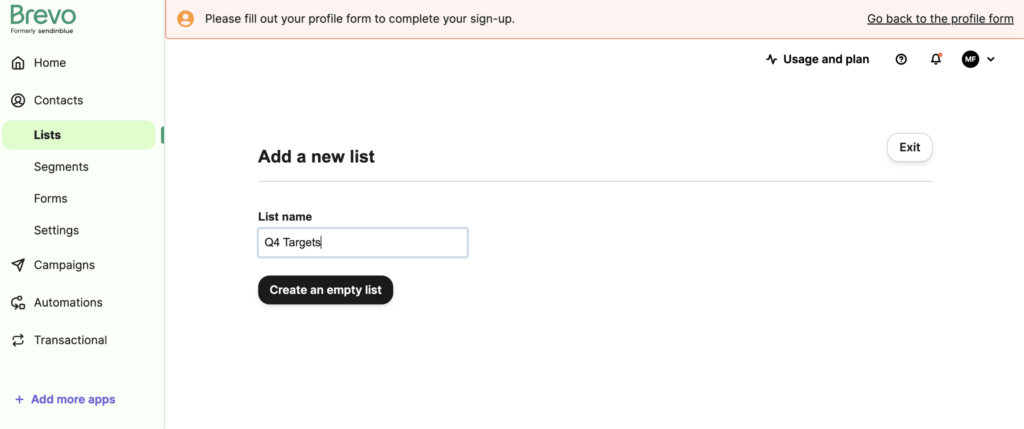
- Contact List Creation: Define a specific list within your plugin or connected Email Marketing Service (EMS) to segment new sign-ups. Proper segmentation at the point of entry ensures that your welcome sequences remain highly relevant to the user’s intent.
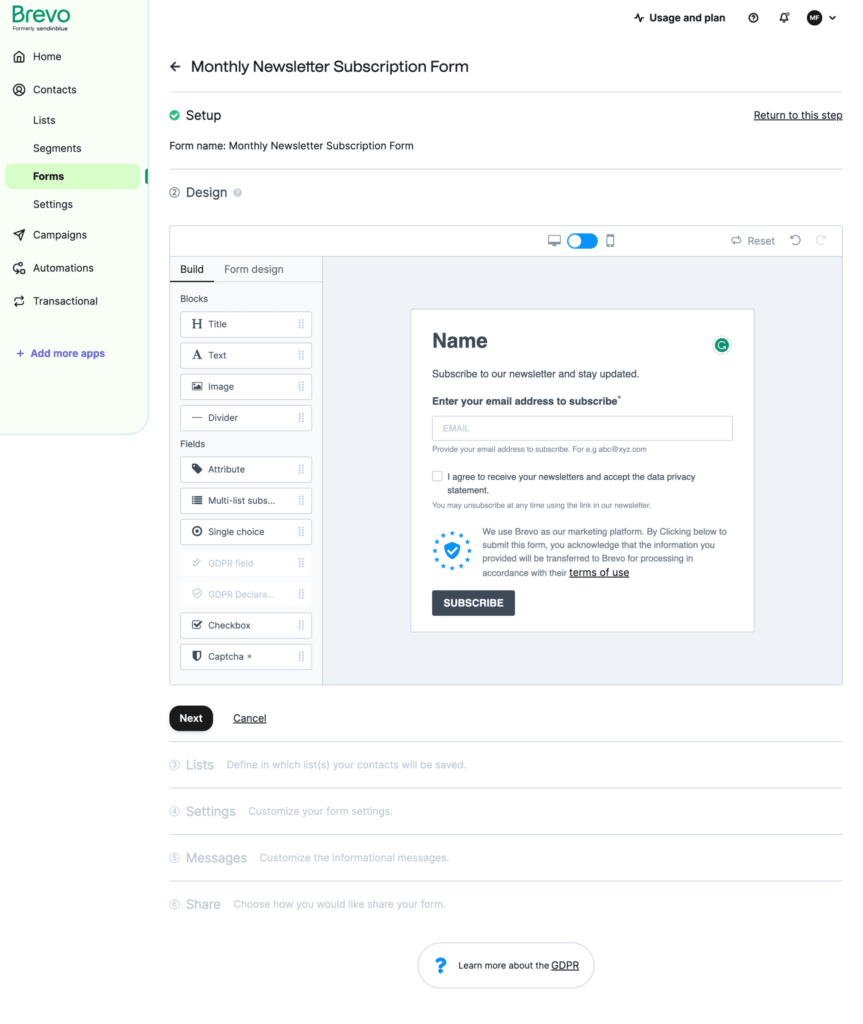
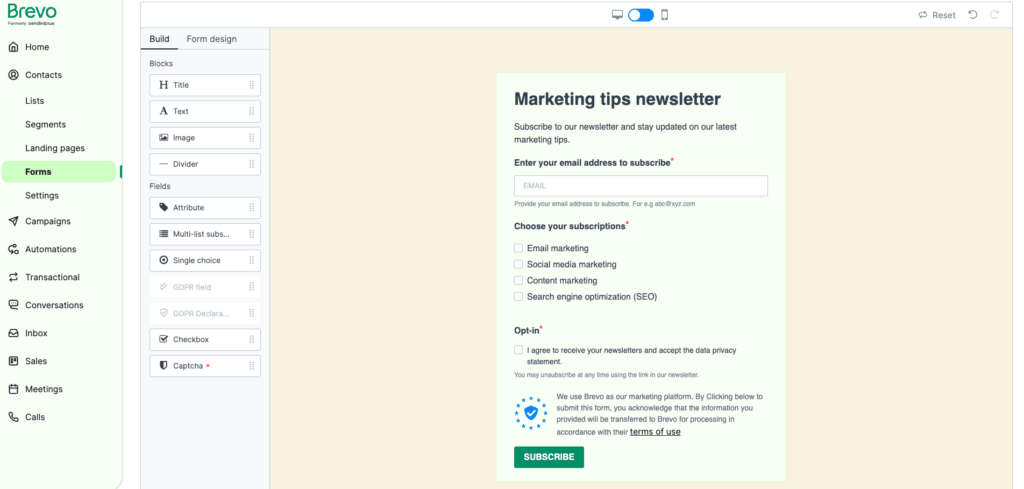
- Form Design: Utilize a block-based editor to design a high-converting form. Focus on a minimal number of fields to reduce friction, typically capturing just a name and email address to maximize conversion rates.
- Technical Configuration: Finalize the backend settings by configuring double opt-in protocols and redirect URLs. Ensuring GDPR compliance and setting up automated confirmation emails at this stage protects your sender reputation.
- Form Deployment: Embed the subscription form strategically using blocks, shortcodes, or widgets in high-visibility areas like the footer, sidebar, or via exit-intent popups to capture visitors before they bounce.
For high-growth stores, the goal of this five-step process is not just to collect addresses, but to build a scalable infrastructure for customer retention. Once your form is live and synchronized with an external EMS, you can move beyond static newsletters and begin leveraging data-driven campaigns, such as abandoned cart recovery and personalized product recommendations, which are essential for increasing Customer Lifetime Value (LTV).
Which is the best WordPress email subscription plugin for eCommerce?
Selecting the ideal email subscription plugin for a WooCommerce environment requires balancing front-end user experience with back-end data synchronization. For high-growth stores, the “best” choice is rarely a generic form builder but rather a specialized commerce solution that bridges the gap between lead capture and behavioral data. To ensure your infrastructure supports revenue expansion rather than just list growth, you must evaluate tools based on their ability to handle real-time sync and deep segmentation.
- Omnisend: Highly recommended for stores needing a babidding of ease and multi-channel capability. It offers deep WooCommerce integration for syncing purchase history and provides pre-built eCommerce workflows like abandoned cart recovery out of the box.
- Klaviyo: The gold standard for data-driven brands. It excels in predictive analytics and advanced segmentation, allowing you to trigger subscription forms based on specific browsing behaviors and past order values.
- MailPoet: An excellent WordPress-native option for those who prefer managing everything within the dashboard. It simplifies the process by automating newsletters and post-purchase follow-ups without requiring external API connections.
- FunnelKit: Ideal for self-hosted power users who want to maintain full ownership of their data within WordPress while still accessing advanced automation and high-converting checkout forms.
From a strategic standpoint, your choice should align with your store’s current scale and long-term technical roadmap. While entry-level plugins like Mailchimp or Omnisend offer rapid deployment for newer stores, established brands should prioritize platforms like Klaviyo or FunnelKit that support complex data-rich feedback loops. Implementing a plugin that offers native integration ensures that your subscription forms do more than just collect emails—they become the entry point for a high-performance communication engine.
How to grow your WooCommerce email list for revenue growth?
Scaling a WooCommerce email list requires moving beyond generic “subscribe to our newsletter” prompts and focusing on high-intent conversion points. For high-growth brands, the focus should be on capturing behavioral data and offering immediate, tangible value that aligns with the customer’s current stage in the buying journey. By implementing strategic opt-ins that trigger based on user interaction, you can significantly increase your list growth rate and build a foundation for automated revenue recovery.
- Exit-Intent Lead Magnets: Deploy specialized forms that trigger when a user is about to leave a product page, offering a time-sensitive discount or a category-specific guide to recover potential lost revenue.
- Post-Purchase Opt-ins: Leverage the checkout success page to encourage customers to join a VIP or loyalty list, ensuring you capture high-value users at their moment of peak brand affinity.
- Behavioral Triggered Pop-ups: Use tracking data to show subscription forms only after a user has viewed a specific number of products or spent a certain amount of time on a page, ensuring your requests are targeted and non-intrusive.
Ultimately, sustainable revenue growth is driven by the quality of your subscribers rather than just the quantity. By utilizing specialized WordPress plugins to integrate these advanced forms, you can ensure that your email list is populated with engaged users who have demonstrated clear buying intent. This technical approach allows you to transition from broad-cast marketing to a more sophisticated, data-driven communication strategy that maximizes the lifetime value of every site visitor.
Ready to take your e-commerce to the next level?
While implementing a basic email subscription form on your WordPress site is a necessary technical starting point, the business reality for high-growth WooCommerce brands is that a growing list is a vanity metric if it is not fueling bottom-line profitability. If your retention efforts feel like they are stalling revenue expansion, or if you suspect that your current data collection lacks the precision to drive high-LTV customer behavior, you are likely facing a structural gap between your acquisition strategy and your CRM infrastructure. Simply capturing emails is not enough; true scale requires a system where consent, tracking, and automation work in perfect concert to maximize every conversion opportunity.
We specialize in transforming static WordPress environments into data-driven eCommerce engines that prioritize profit and long-term customer value. As a strategic extension of your in-house team, we eliminate guesswork by aligning your performance marketing with sophisticated lifecycle automation and advanced analytics. Our process begins with rigorous, conversion-focused audits designed to identify the exact technical and strategic bottlenecks eroding your ROAS. If you are ready to move beyond manual setups and build a scalable system that maximizes your store’s ROI, book a free marketing automation audit today.