


The regulatory landscape has shifted from being a back-office compliance concern to a front-line strategic risk for every high-growth eCommerce brand. While Google Tag Manager offers unparalleled agility for deploying tracking and marketing pixels, its role as a delivery mechanism for third-party cookies puts it directly in the crosshairs of GDPR and CCPA enforcement. For leadership teams, the challenge is no longer just about maintaining data flow, but about ensuring that every tracking script fires within a legally defensible framework that respects user privacy without sacrificing critical attribution data.
Ignoring the intersection of tag management and consent management is a gamble that risks both heavy financial penalties and the erosion of customer trust. Transitioning to a privacy-first tracking architecture requires a sophisticated understanding of how GTM interacts with browser-side storage and the technical levers available to automate compliance. This guide examines the mechanics of GTM cookie usage and provides a roadmap for integrating robust consent protocols that protect your revenue streams while satisfying global privacy standards.
What is Google Tag Manager and how does it work?
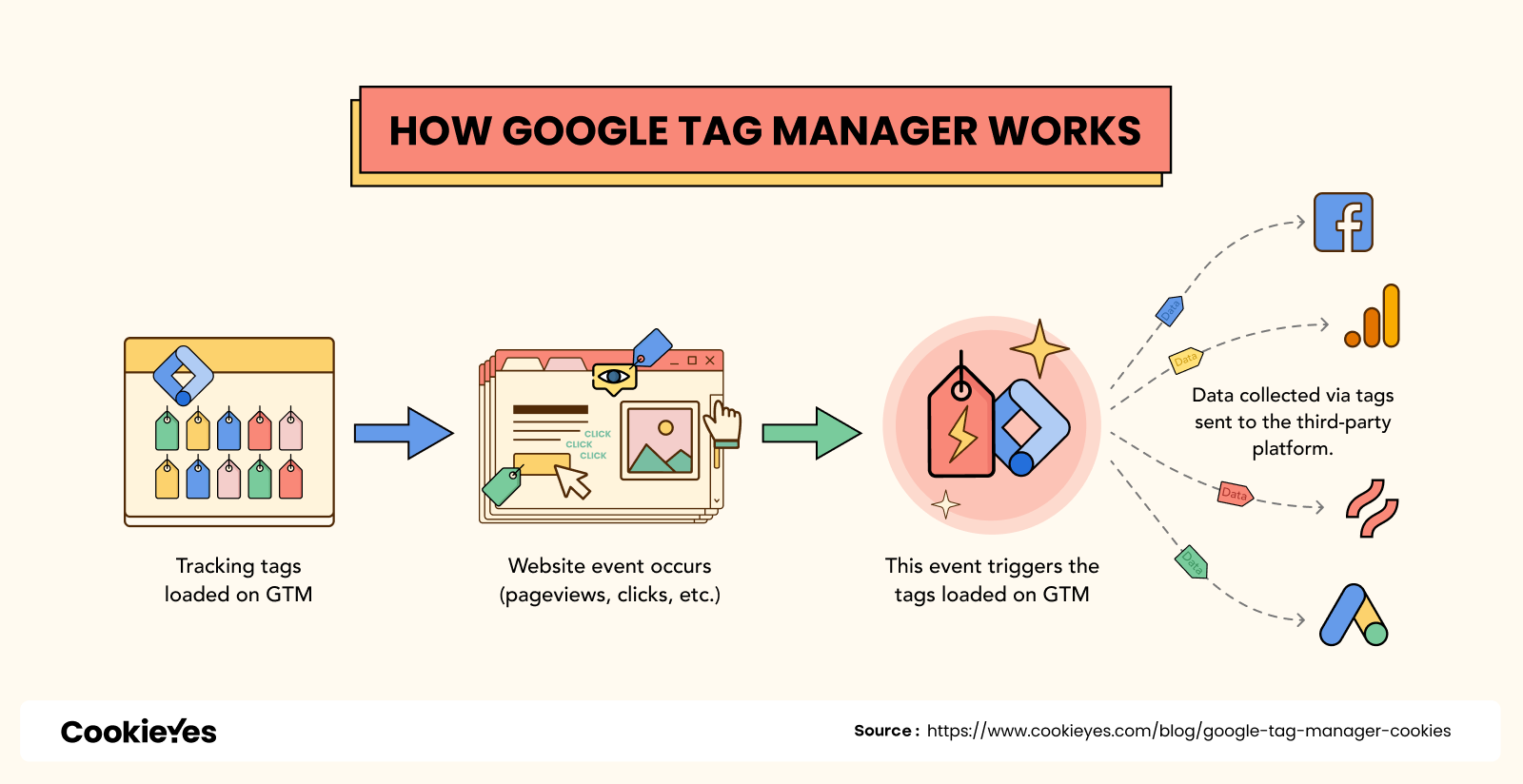
Google Tag Manager (GTM) is a free tag management system that functions as a centralized hub for deploying and managing marketing and analytics tags on your website without the need to manually edit source code. For WooCommerce store owners, GTM acts as an essential intermediary that sits between your site and third-party tools, allowing you to remotely push tracking pixels and scripts—such as Google Analytics 4, Meta Pixels, and conversion trackers—directly to your store through an intuitive web interface.
- Tags: These are snippets of code or tracking pixels provided by third-party services that collect and send interaction data from your website to their respective platforms.
- Triggers: These are specific conditions or events—such as page views, button clicks, or form submissions—that GTM monitors to determine exactly when a tag should be executed.
- Variables: These are named placeholders for dynamic values that change based on user context, such as a product’s price, name, or a transaction ID, which are then used by tags and triggers to provide granular data.
- Data Layer: This is a temporary client-side repository that holds structured information, enabling GTM to reliably pass custom eCommerce data from your store to various marketing tools.
Operationally, GTM works by utilizing a small container snippet installed on every page of your site that “listens” for user interactions. When a visitor performs an action that matches a pre-defined trigger, GTM instantly fires the associated tag, which then processes the relevant data and forwards it to your analytics or advertising services. This architecture provides high-growth brands with the flexibility to launch campaigns and troubleshoot tracking errors with minimal dependency on web developers, ensuring technical agility as your store scales.
Why is cookie consent required for Google Tag Manager?
For high-growth WooCommerce brands, the requirement for cookie consent within Google Tag Manager (GTM) is not just a technical formality but a critical legal and business necessity. While GTM itself is a container and does not inherently store cookies, it acts as a delivery mechanism for various scripts—such as Google Analytics, Meta Pixels, and LinkedIn Insight tags—that do deploy third-party cookies to track user behavior and personal data. Under regulations like GDPR and CCPA, deploying these tracking technologies without explicit user authorization constitutes a compliance violation that can lead to substantial financial penalties and legal exposure.
- Regulatory Compliance: Laws like GDPR and CCPA mandate that websites must obtain informed consent before collecting personal data or storing non-essential cookies on a visitor’s browser.
- Mitigation of Business Risk: Unmonitored or non-compliant tags are a significant liability that can lead to hefty fines, lawsuits, and the erosion of consumer trust, which directly impacts long-term Customer Lifetime Value (LTV).
- Data Governance and Security: Implementing a consent framework ensures that your store only triggers scripts based on a user’s specific privacy choices, preventing unauthorized data leakage to third parties and protecting your brand’s reputation.
Failing to integrate a robust cookie consent solution with GTM creates a “silent ceiling” on your revenue by exposing your business to preventable legal risks. For an eCommerce consultant, the goal is to balance high-performance tracking with data privacy; by configuring GTM to respect consent signals, you ensure that your measurement infrastructure is both scalable and legally defensible, safeguarding your store’s profitability and customer relationships.
How to implement GDPR compliant cookie consent in GTM?
Implementing GDPR-compliant cookie consent within Google Tag Manager requires a shift from simple tag deployment to a consent-driven orchestration. The core of this process is Google Consent Mode, which allows you to adjust how tags behave based on the specific consent granted or denied by your users. By integrating a compatible Consent Management Platform (CMP) with GTM, you can ensure that tracking scripts for analytics and advertising only fire after the appropriate legal basis has been established.
- Enable Consent Overview: Activate the “Consent Overview” feature in your GTM container settings to gain a high-level view of which tags require additional consent checks and which have built-in compliance logic.
- Configure Default States: Use a “Default” command to set the initial consent state (typically “denied” for GDPR regions) for parameters like ad_storage and analytics_storage before any other tags are triggered.
- Map Custom Triggers: Replace standard “All Pages” triggers with custom events pushed by your CMP (e.g., ‘cookie_consent_update’) to ensure tags only execute once the user has made a selection.
For high-growth stores, verifying this implementation is critical to avoid data gaps or legal exposure. Utilize GTM’s Preview mode and the Tag Assistant tool to confirm that tags are correctly respecting consent states and that the ‘update’ command is successfully firing after a user interacts with your cookie banner. This systematic approach balances the need for actionable marketing data with the strict transparency and user control mandates required by modern privacy regulations.
What are the best GTM privacy practices for WooCommerce growth?
For high-growth WooCommerce stores, implementing Google Tag Manager (GTM) is no longer just a technical convenience; it is a critical component of data governance. In the current regulatory landscape, treating GTM as a “neutral container” is a legal liability, as modern rulings require explicit consent even for loading the GTM script itself due to the transmission of personal data like IP addresses. To balance aggressive eCommerce growth with strict compliance, brands must shift toward a “Privacy-First” tracking architecture that ensures no data is leaked before a user interacts with a consent banner.
- Implement Google Consent Mode v2: Utilize GCM v2 to dynamically adjust the behavior of Google Analytics and Ads tags based on user choices, allowing for anonymized data modeling even when full cookie consent is denied.
- Utilize Consent Initialization Triggers: Configure your GTM container to fire consent default values via the “Consent Initialization” trigger, ensuring security and privacy settings are established before any marketing or analytics tags attempt to execute.
- Audit Tags for Data Minimization: Regularly review your GTM container to remove redundant scripts and ensure each active tag has a documented purpose, adhering to the GDPR principles of purpose limitation and data minimization.
By adopting these practices, WooCommerce store owners can protect their marketing data from vanishing while mitigating the risk of heavy financial penalties. A robust GTM configuration, integrated with a verified Consent Management Platform (CMP), provides the technical foundation necessary to maintain high-quality data flow and accurate conversion measurement without compromising user trust or legal compliance.
How to automate cookie compliance for eCommerce revenue protection?
Automating cookie compliance within Google Tag Manager (GTM) is a critical strategy for WooCommerce store owners to protect revenue from legal risks and data loss. By leveraging a Consent Management Platform (CMP) integrated with GTM, you can ensure that marketing and analytics tags only fire after receiving explicit user consent, thereby maintaining GDPR and CCPA compliance without manual oversight. This automated “gatekeeper” approach prevents unauthorized data collection while allowing for “Consent Mode” to recover lost conversion data through modeled insights when users opt out.
To effectively automate this workflow for a high-growth eCommerce environment, focus on these key technical integration steps:
- Consent Mode v2 Implementation: Update your GTM container to support the latest Consent Mode parameters, which allow Google tags to dynamically adjust their behavior based on the user’s granular consent status for advertising and personalization.
- Data Layer Synchronization: Configure your CMP to push custom events and consent objects directly to the GTM Data Layer, enabling you to set precise trigger conditions for your WooCommerce tracking tags.
- Automated Tag Blocking: Utilize GTM’s built-in consent settings to assign required consent types to each tag, ensuring that third-party scripts remain dormant until the specific legal requirements for “Analytics” or “Marketing” categories are met.
By automating these privacy controls, you mitigate the risk of heavy non-compliance fines while building the consumer trust necessary for long-term brand equity. This robust technical framework ensures that your data collection strategy remains compliant with evolving state and international regulations, allowing your team to focus on scaling revenue rather than managing manual compliance updates.
Ready to take your e-commerce to the next level?
While mastering the technical steps to verify cookie deployment is a vital compliance check, the business reality for high-growth WooCommerce brands is that privacy-compliant data collection is the bedrock of your entire marketing engine. If your tracking infrastructure feels like it is stalling your ROAS, or if you suspect that signal loss from mismanaged consent is eroding your attribution accuracy, you are facing a structural ceiling on your growth. In the modern eCommerce landscape, treats like cookie banners aren’t just legal hurdles; they are critical touchpoints where technical precision determines whether you capture high-intent data or lose it to the void of non-compliance.
To move beyond basic implementation and build a high-performance system where privacy and profitability coexist, you need a partner that synchronizes your consent management with your broader scaling objectives. We act as a strategic extension of your team, helping DTC brands maximize Profit, Retention, and LTV through data-driven systems where advanced tracking, CRM, and automation operate in perfect concert. Our process begins with rigorous, conversion-focused audits to eliminate guesswork and identify the exact bottlenecks in your data collection and customer journey. If you are ready to transform your technical backend into a scalable asset that maximizes long-term growth, book a free consultation today.



Comments