


For high-growth eCommerce brands, the transition from passive consent to intentional choice represents a fundamental shift in how customer relationships are built. As nearly half of all users now actively read cookie banners before engaging, these technical touchpoints have evolved from mere legal hurdles into critical displays of brand values and transparency. When a customer decides whether to share their data, they are essentially making a trust-based investment in your brand, making the accuracy of your cookie deployment a vital business metric.
The business reality is that privacy-compliant data collection is now the bedrock of any scalable marketing and revenue operation. Relying on the visual comfort of a banner without verifying the underlying data flows creates a technical gap that invites regulatory risk and erodes the very trust required for high-performance retention. By mastering the technical steps to audit and verify your site’s cookie behavior, you ensure that your marketing stack operates ethically and effectively, transforming compliance from a cost center into a strategic advantage.
What are website cookies and how do they impact WooCommerce privacy?
Website cookies are small text files stored in a visitor’s browser that allow your WooCommerce store to “remember” specific information and interactions. For a growing eCommerce brand, these digital identifiers are essential for maintaining session state, such as keeping a user logged in or preserving items in a shopping cart as they navigate your site. However, because many cookies collect personal data like IP addresses and browsing patterns, they directly impact privacy and fall under the strict governance of regulations like the GDPR and CPRA.
- Strictly Necessary Cookies: These are essential for core store functions, such as the WooCommerce cart and checkout process, and generally do not require prior user consent under privacy laws.
- Functional Cookies: These enhance the user experience by remembering preferences like language or currency, bridging the gap between basic utility and a personalized shopping environment.
- Marketing and Analytics Cookies: Used for tracking behavior and retargeting, these cookies collect sensitive data and require explicit opt-in consent to avoid heavy financial penalties.
From a strategic growth perspective, ignoring how these cookies impact privacy can lead to significant business risks. Failing to obtain valid consent for non-essential tracking can result in fines up to €20 million or 4% of global revenue under GDPR. Beyond legal compliance, transparently managing your WooCommerce cookies builds consumer trust, which is a critical driver for long-term customer retention and brand affinity in a privacy-conscious market.
How to check cookies on a website using browser developer tools?
For high-growth WooCommerce brands, auditing your site’s cookie behavior is a critical technical requirement to ensure your marketing stack doesn’t trigger regulatory red flags. Using browser developer tools allows you to move beyond visual confirmation of a banner and see exactly which data points are being stored on a user’s machine. To begin this audit, open your store in a “Clean” or Incognito window, right-click anywhere on the page, and select “Inspect” to launch the DevTools suite.
- The Application Tab: Once DevTools is open, navigate to the “Application” tab and expand the “Cookies” section in the left sidebar to view every cookie currently set by your domain.
- The Network Tab: To trace the specific moment a cookie is fired, use the “Network” tab and filter by “cookie” or the script name; this is essential for verifying “prior consent” by ensuring no non-essential scripts execute before a user interacts with your banner.
- Console Verification: You can also perform a quick check by typing “document.cookie” into the “Console” tab, which will return a raw string of all cookies currently accessible to the page.
Identifying “leaky” implementations—where tracking pixels or analytics scripts fire on page load before a user grants permission—is a common technical failure that breaks GDPR Article 7 compliance. By regularly auditing these tools, you can ensure your Consent Management Platform (CMP) is programmatically blocking non-essential services, thereby protecting your store from potential fines while maintaining a data-driven growth strategy built on transparency and trust.
Why should WooCommerce stores use GDPR compliant cookie banners for growth?
For WooCommerce store owners, implementing a GDPR-compliant cookie banner is a fundamental component of a sustainable growth strategy rather than a mere legal hurdle. By providing transparency regarding data collection, you foster a relationship of trust with your audience, which is a critical driver of long-term customer retention and brand equity. In an era where consumers are increasingly protective of their digital footprint, a clear and honest consent mechanism demonstrates professional integrity and respect for user privacy.
- Brand Trust and Credibility: Transparently informing users about the cookies your store uses—whether for essential cart functions, statistics, or marketing—builds consumer confidence and reduces the likelihood of bounce rates caused by intrusive or deceptive designs.
- Mitigating Legal and Financial Risk: Adhering to GDPR standards protects your business from significant fines and legal complications, ensuring that your revenue expansion is built on a compliant and secure foundation.
- Optimized Marketing Data: By using a Consent Management Platform (CMP), you can accurately track and store user preferences, allowing you to refine your marketing efforts based on high-quality data from customers who have explicitly opted into tracking.
Ultimately, a programmatic approach to cookie consent ensures that your WooCommerce site remains operational and optimized across all end devices, including mobile platforms. Regularly updating your privacy policies and maintaining detailed consent logs serves as digital proof of your commitment to data protection, strengthening your position in a competitive global marketplace.
How to verify if your eCommerce marketing cookies are tracking correctly?
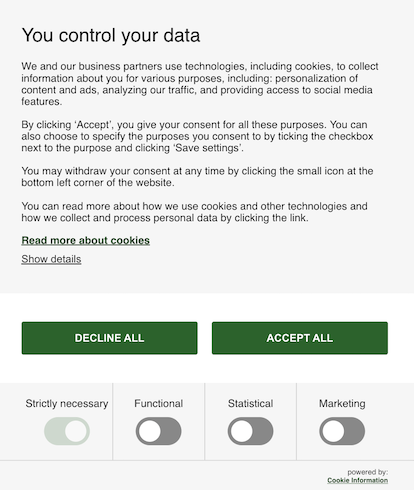
For high-growth WooCommerce stores, verifying that marketing cookies are tracking correctly is essential for both regulatory compliance and the accuracy of your attribution models. A common pitfall is the “silent violation” where non-essential tracking scripts fire before a user has provided explicit consent via your banner. To ensure your revenue growth is built on a compliant technical foundation, you must move beyond visual confirmation and perform technical validation using browser developer tools.
- Initial State Verification: Open your store in an Incognito window and use the “Application” tab in DevTools (F12) to ensure no non-essential cookies from platforms like Meta or Google are present before you interact with the banner.
- Consent Propagation Testing: After clicking “Accept,” verify that the expected marketing cookies appear in the “Storage” section and that network requests are successfully sent to your analytics and advertising endpoints.
- Rejection Integrity: Refresh the page and select “Reject” to confirm that any existing non-essential cookies are removed and that no further tracking scripts are initiated during the session.
Sustaining this accuracy requires continuous auditing, especially after updating plugins or modifying your Google Tag Manager configurations. By regularly running these compliance tests, you prevent data drift and ensure that your marketing spend is optimized based on reliable, legally obtained customer signals.
How to automate cookie consent for your WooCommerce revenue expansion strategy?
Automating cookie consent within a WooCommerce environment is no longer just a compliance checkbox; it is a technical prerequisite for scaling high-performance marketing and revenue operations. For high-growth stores, manual cookie management is unsustainable due to the dynamic nature of third-party scripts from analytics, retargeting pixels, and abandoned cart tools that require explicit user opt-in under GDPR and CPRA. By implementing an automated Consent Management Platform (CMP), brands can ensure that technical tracking only initializes after valid consent is secured, protecting the store from significant financial liabilities while maintaining the integrity of data used for revenue expansion.
To integrate automation effectively into your growth strategy, focus on these core technical components:
- Automated Scanning and Categorization: Utilize CMP tools that continuously scan your WooCommerce store to detect and categorize new cookies, ensuring your disclosure remains accurate without manual intervention.
- Dynamic Script Blocking: Configure your infrastructure to automatically block high-impact tracking scripts, such as Facebook Pixels or Google Analytics, until the user provides active consent.
- Google Consent Mode v2 Integration: Implement advanced consent signaling to adjust how Google tags behave based on user choice, allowing for aggregated data collection and conversion modeling even when cookies are declined.
- Consent Log Auditing: Automate the storage and management of consent logs to provide a verifiable audit trail for regulatory bodies, mitigating legal risks during high-traffic sales cycles.
Transitioning to an automated framework allows your team to shift focus from compliance maintenance to leveraging consented data for smarter segmentation and hyper-personalized campaigns. This approach ensures that every customer touchpoint is built on a foundation of trust, which is essential for long-term revenue growth and brand equity in the competitive eCommerce landscape.
Ready to take your e-commerce to the next level?
While mastering the technical steps to verify cookie deployment is a vital compliance check, the business reality for high-growth WooCommerce brands is that privacy-compliant data collection is the bedrock of your entire marketing engine. If your tracking infrastructure feels like it is stalling your ROAS, or if you suspect that signal loss from mismanaged consent is eroding your attribution accuracy, you are facing a structural ceiling on your growth. In the modern eCommerce landscape, treats like cookie banners aren’t just legal hurdles; they are critical touchpoints where technical precision determines whether you capture high-intent data or lose it to the void of non-compliance.
To move beyond basic implementation and build a high-performance system where privacy and profitability coexist, you need a partner that synchronizes your consent management with your broader scaling objectives. We act as a strategic extension of your team, helping DTC brands maximize Profit, Retention, and LTV through data-driven systems where advanced tracking, CRM, and automation operate in perfect concert. Our process begins with rigorous, conversion-focused audits to eliminate guesswork and identify the exact bottlenecks in your data collection and customer journey. If you are ready to transform your technical backend into a scalable asset that maximizes long-term growth, book a free consultation today.



Comments