


If you’ve ever compared GA4’s user counts against your actual customer database and found the numbers don’t line up, the confusion usually traces back to one thing: mixing up User ID and Client ID. These two identifiers serve completely different purposes in GA4, and using the wrong one — or not understanding which one is actually populating your reports — leads to inflated user counts, broken cross-device tracking, and unreliable customer journey data. In this article, we’ll clarify exactly what separates User ID from Client ID, why the distinction matters for ecommerce reporting, and how a proper WooCommerce integration can improve the accuracy of both.
What Is a Client ID in GA4 and How Is It Generated?
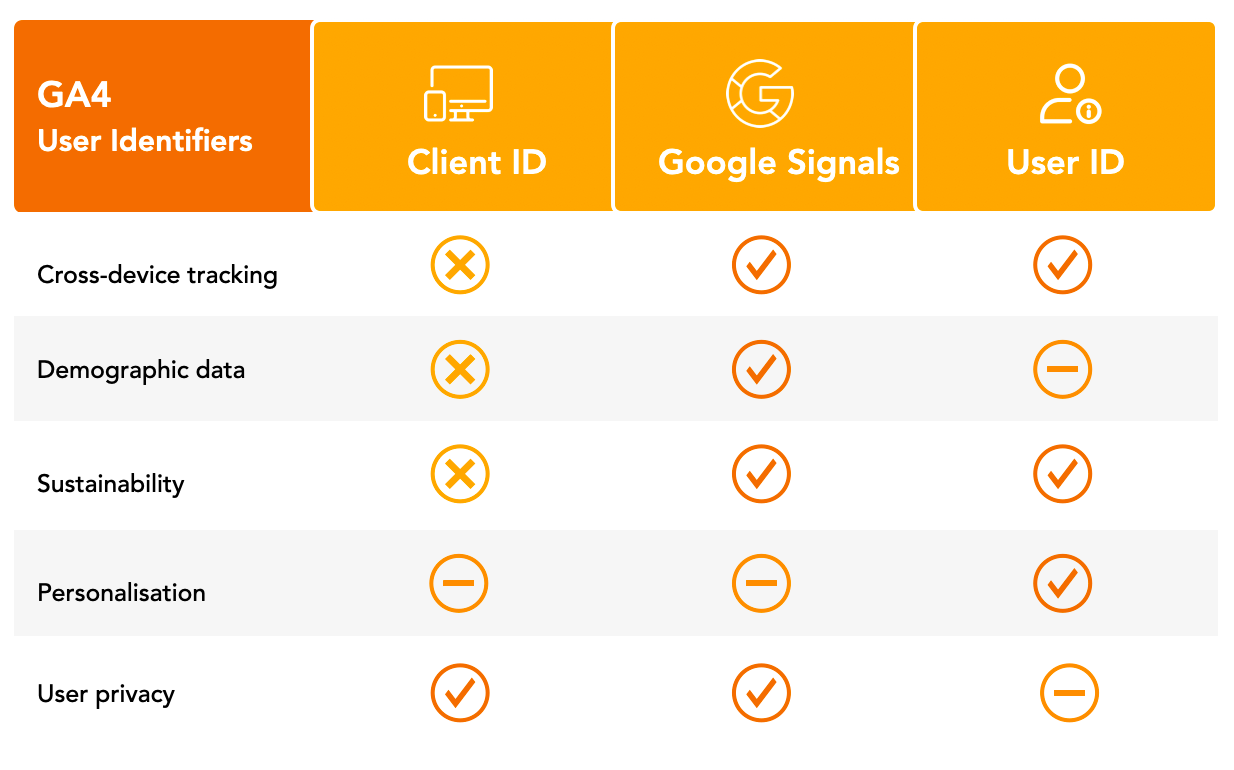
Client ID is an anonymous, randomly generated identifier that GA4 automatically assigns to a browser or device the first time it interacts with your site, stored via a first-party cookie (typically _ga). Key characteristics of Client ID:
- Automatically generated: no setup required — GA4 creates and assigns a Client ID by default for every tracked visitor, without needing any custom configuration.
- Tied to browser/device, not the person: the same individual visiting your store from a laptop and then a phone generates two entirely separate Client IDs, since each is tied to the specific browser instance and its stored cookie.
- Vulnerable to reset: clearing cookies, using incognito mode, or switching browsers all generate a new Client ID, even though it’s the same actual visitor returning.
- The default identity source: unless User ID is explicitly implemented, GA4 relies on Client ID as its primary way of distinguishing between “users” in reporting.
This is precisely why GA4’s default “users” metric tends to overcount actual unique customers — a single person browsing on their phone, then completing a purchase on a laptop, appears as two separate Client IDs and therefore two separate “users” in standard reporting, even though only one real customer was involved. For WooCommerce stores where customers frequently research on mobile and purchase on desktop (or vice versa), this overcounting can be substantial and directly affects the accuracy of acquisition and conversion reporting.
What Is a User ID in GA4 and Why Does It Matter for Ecommerce?
User ID is a persistent identifier that you explicitly assign and pass into GA4, typically tied to a logged-in account or customer record, allowing GA4 to recognize the same actual person across multiple devices, browsers, and sessions.
Why User ID matters specifically for ecommerce:
- Solves cross-device attribution: a customer who researches on mobile and purchases on desktop can be correctly recognized as a single user, rather than two disconnected Client IDs.
- Requires explicit implementation: unlike Client ID, User ID doesn’t populate automatically — it needs to be set when a customer logs in or is otherwise identified, typically tied to your customer account system.
- Enables more accurate lifetime and behavioral reporting: with User ID properly implemented, GA4 can build a more complete picture of a customer’s actual journey across every touchpoint, rather than fragmented, device-specific sessions.
- Only covers identified users: guest checkouts or non-logged-in sessions still rely on Client ID, meaning User ID coverage is typically partial unless account creation or login is heavily incentivized.
The practical value for a WooCommerce store is significant: connecting your logged-in customer IDs to GA4’s User ID feature means repeat customer behavior, cross-device research patterns, and true customer lifetime engagement become visible in a way that Client ID alone simply can’t provide, since Client ID has no concept of “this is the same person” once a cookie is cleared or a new device is used.
Why Does GA4 Report Inflated or Inconsistent User Counts?
Inflated or inconsistent user counts in GA4 are rarely a tracking bug — they’re a direct, predictable consequence of relying on Client ID as the default identity signal, combined with how modern browsing behavior actually works. The main drivers of this inflation:
- Cross-device behavior is the norm, not the exception: ecommerce customers routinely research on one device and purchase on another, and without User ID, each device generates a separate, uncounted-as-the-same-person Client ID.
- Cookie clearing and privacy settings: browsers with aggressive cookie management, incognito browsing, or privacy-focused settings regenerate Client IDs more frequently than expected, artificially inflating “new user” counts for genuinely returning visitors.
- Multi-browser usage: a customer switching between Chrome and Safari on the same device, for instance, produces two separate Client IDs despite being a single person.
- Guest checkout prevalence: since Client ID is the fallback for anyone not logged in, and guest checkout is common in ecommerce, a large share of traffic remains identity-fragmented by default.
The common mistake is treating GA4’s default “users” metric as a reliable count of actual unique customers without accounting for this structural fragmentation. For WooCommerce stores making acquisition or retention decisions based on GA4 user counts, this inflation can meaningfully distort the picture — appearing to have more unique visitors or a lower repeat-visitor rate than the business actually has, simply because the same customers are being counted multiple times across devices and sessions.
How Can You Implement User ID Tracking in a WooCommerce Store?
Implementing User ID tracking requires connecting your WooCommerce customer account system to GA4’s User ID feature, which isn’t automatic and typically requires either custom development or a properly configured tracking integration. The general implementation approach:
- Assign a persistent, non-personally-identifiable user ID at the point of login or account creation — critically, this should be an internal customer ID, never an email address or other directly identifying information, to remain compliant with GA4’s data policies.
- Pass the User ID into GA4’s data layer whenever a logged-in customer interacts with the site, ensuring it’s consistently sent across every session, not just at login.
- Configure GA4’s User-ID feature in the property settings, enabling GA4 to use this signal alongside Client ID rather than relying on Client ID alone.
- Validate the implementation using GA4’s DebugView, confirming the User ID is firing correctly and consistently across devices and sessions before relying on the reporting.
Consent management is a critical consideration here — User ID tracking, since it ties behavior to an identifiable customer record, needs to be implemented within a privacy-compliant framework that respects what the customer has actually consented to, not layered on as an afterthought. For WooCommerce brands already syncing customer data into a CRM, this same customer ID can often be reused for GA4’s User ID feature, creating consistency across the entire tracking and marketing automation stack rather than maintaining separate, disconnected identifiers.
Should You Rely on User ID, Client ID, or Both for Ecommerce Reporting?
The right approach isn’t choosing one over the other — it’s understanding what each is structurally capable of measuring accurately, and using them together rather than expecting either alone to give a complete picture. How to think about using both:
- Client ID remains necessary for tracking anonymous, non-logged-in traffic, which represents a meaningful share of ecommerce sessions, especially pre-purchase browsing and guest checkout.
- User ID should supplement, not replace, Client ID for logged-in customers, providing the cross-device accuracy that Client ID structurally can’t offer.
- GA4’s reporting identity setting determines how the platform blends these signals — typically prioritizing User ID when available and falling back to Client ID (and then modeled data) when it isn’t, which is worth understanding when interpreting reports.
- Neither fully solves attribution on its own: even with User ID implemented, guest sessions and pre-login browsing still rely on Client ID, meaning some fragmentation is unavoidable unless account creation is required site-wide (which introduces its own conversion friction).
The realistic goal for most WooCommerce stores is maximizing User ID coverage among logged-in and returning customers — where it has the highest impact on reporting accuracy — while accepting that guest and anonymous traffic will continue to rely on Client ID’s more fragmented, device-based tracking. Treating this as a spectrum of data completeness, rather than an all-or-nothing implementation, leads to more realistic expectations about what GA4 can and can’t tell you.
Ready to take your e-commerce to the next level?
If your GA4 reporting has never quite matched what you know to be true about your actual customer base, the User ID vs Client ID distinction is often exactly why — and it’s rarely fixed by adjusting a dashboard filter. Getting this right requires connecting your actual customer data to your tracking setup, not just accepting GA4’s default identity signals at face value.
This is exactly the kind of technical gap we help DTC and ecommerce brands close. As an extension of your in-house team, we build data-driven systems where advanced tracking, consent management, and CRM data work together — so your GA4 reporting actually reflects real customer behavior, not inflated or fragmented device-based counts. If you want a clear, honest read on how accurately your tracking is capturing your customer base, book a free marketing automation audit and get a data-driven, conversion-focused view of what’s really happening under the hood.



Comments