


Picking a CRM for a WooCommerce store often turns into a feature-comparison exercise that misses the question that actually matters: how well will this system connect to your real order and customer data, and will it still work once you’re running behavioral automation across email, SMS, and paid media at scale? A CRM that looks impressive in a demo but integrates poorly with WooCommerce becomes a liability rather than an asset. In this article, we’ll walk through what actually matters when choosing a CRM for a WooCommerce store, the integration considerations most buyers overlook, and how to evaluate options against your store’s real growth stage rather than a generic feature checklist.
What Should a WooCommerce Store Actually Look for in a CRM?
Choosing a CRM for ecommerce is a fundamentally different exercise than choosing one for a B2B sales team — the priorities center on order data integration, behavioral segmentation, and marketing automation capability rather than sales pipeline management.
The core evaluation criteria that matter most:
- Native or well-maintained WooCommerce integration: the depth and reliability of the connection between WooCommerce order data and the CRM directly determines how sophisticated your segmentation and automation can actually be.
- Behavioral and purchase-based segmentation: the ability to segment customers by purchase history, browsing behavior, and engagement, not just static demographic fields.
- Email and SMS automation built-in or tightly integrated: since lifecycle marketing is typically the primary use case, the CRM’s own automation capability (or its integration with a dedicated ESP/SMS platform) matters significantly.
- Real-time or near-real-time data sync: a CRM that only syncs order data on a delayed schedule limits how responsive behavior-triggered automation can actually be.
- Scalability with catalog and customer base growth: a CRM that works well for a small catalog and customer list may become a bottleneck as both scale, so evaluating growth-stage fit matters as much as current-state fit.
The common mistake is evaluating CRMs primarily on general feature breadth rather than depth of ecommerce-specific, WooCommerce-integrated functionality. A CRM with an impressive general feature set but weak or unreliable WooCommerce data sync will underperform a more focused, ecommerce-native platform with a genuinely robust integration, because the entire value of a CRM in this context depends on how accurately and completely it reflects real customer and order behavior.
How Important Is Native WooCommerce Integration vs. Third-Party Connectors?
The quality and depth of a CRM’s WooCommerce integration is arguably the single most important selection factor, since even the most sophisticated segmentation and automation capabilities are only as good as the underlying data feeding them.
Key distinctions worth understanding:
- Native integrations: built and maintained specifically for WooCommerce, typically offering more complete data sync (order status changes, product variations, customer accounts) and more reliable long-term compatibility as both platforms update.
- Third-party connector tools (like generic automation platforms): can work well but introduce an additional layer of dependency, potential sync delays, and sometimes incomplete data mapping compared to a purpose-built integration.
- API-based custom integrations: offer maximum flexibility and control but require development resources to build and maintain, making them more suitable for larger stores with dedicated technical capacity.
- Data completeness matters more than connection speed: a fast-syncing integration that only passes partial order data (missing product categories or customer lifetime value calculations, for instance) is less valuable than a slightly slower one that passes comprehensive, accurate data.
The mistake many store owners make is assuming any integration labeled “WooCommerce compatible” provides equivalent functionality. In practice, integration quality varies significantly — some sync only basic order totals, while others provide granular product-level data, customer lifecycle stage, and real-time inventory status. Testing the actual depth and reliability of a CRM’s WooCommerce integration, rather than trusting marketing claims about compatibility, is essential before committing to a platform that your entire marketing automation strategy will depend on.
Why Does Behavioral Segmentation Capability Matter More Than Basic Contact Management?
Many CRMs handle basic contact management competently, but the capability that actually differentiates a genuinely useful ecommerce CRM is its depth of behavioral and purchase-based segmentation — the foundation that everything else (automation, personalization, retention) depends on.
What meaningful segmentation capability looks like:
- RFM-based segmentation: native or easily configurable Recency, Frequency, Monetary scoring, allowing customers to be grouped by actual purchase behavior rather than static attributes.
- Dynamic, rule-based segments: segments that automatically update as customer behavior changes (a customer moving from “new customer” to “repeat customer” segment upon a second order), rather than requiring manual re-tagging.
- Behavioral trigger support: the ability to trigger automation based on specific actions (cart abandonment, browse behavior, post-purchase timing) rather than only time-based or static list criteria.
- Cross-channel segment application: segments that can be applied consistently across email, SMS, and potentially paid media audience syncing, rather than being siloed within a single channel.
The common mistake is selecting a CRM based on its contact management and basic email-sending capability while underweighting how sophisticated its segmentation logic actually is. A platform with excellent email design tools but shallow segmentation capability will consistently underperform a less polished platform with genuinely dynamic, behavior-driven segmentation, because the messaging relevance that segmentation enables matters more to campaign performance than email template design.
When Should You Choose an All-in-One Platform vs. Best-of-Breed Tools?
Ecommerce brands generally face a choice between an all-in-one CRM/marketing platform that handles email, SMS, and segmentation within one system, versus a best-of-breed approach combining specialized tools connected through integrations — and the right choice depends heavily on store size and internal technical capacity.
Considerations for each approach:
- All-in-one platforms favor simplicity and consistency: a single system reduces integration complexity and ensures segmentation data is consistently available across every channel, which suits smaller teams without dedicated technical resources.
- Best-of-breed tools often offer deeper capability per function: a dedicated email platform, dedicated SMS platform, and separate CRM can each offer more sophisticated features within their specific domain than an all-in-one platform’s equivalent feature.
- Integration complexity scales with team size and technical resources: best-of-breed setups require more ongoing integration maintenance, which is more manageable for larger teams or brands working with a technical partner than for a small, resource-constrained team.
- Data consistency risk increases with more disconnected tools: every additional tool in the stack introduces another potential point of data sync failure or inconsistency, which needs to be weighed against the deeper functionality each specialized tool offers.
The mistake to avoid is choosing an approach based on tool sophistication alone without honestly assessing internal capacity to manage the resulting complexity. A best-of-breed stack assembled without sufficient technical resources to maintain proper integration often ends up performing worse than a well-configured all-in-one platform, simply because data consistency and automation reliability suffer when integrations aren’t actively maintained.
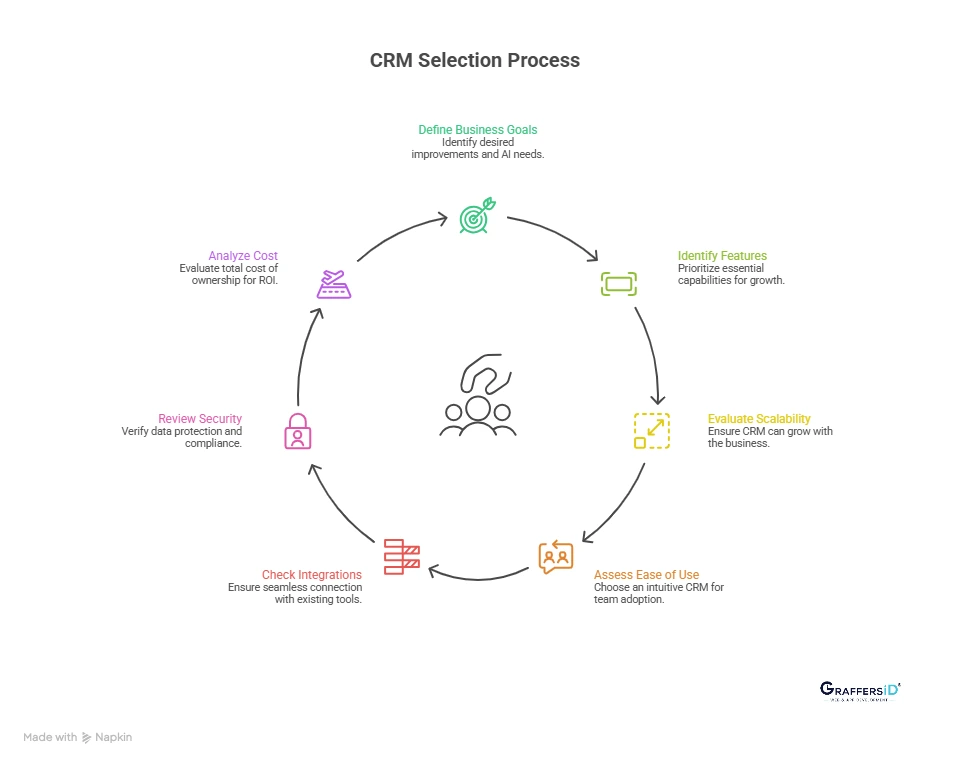
How Should You Evaluate CRM Pricing and Scalability for a Growing Store?
CRM pricing models for ecommerce typically scale with contact list size, order volume, or feature tier, and evaluating cost only at current scale — without considering how pricing changes as the store grows — often leads to a costly platform migration down the line.
Key pricing and scalability factors to evaluate:
- List size-based pricing tiers: understand how costs increase as your contact list grows, since some platforms have pricing structures that become disproportionately expensive at scale compared to competitors.
- Feature availability by tier: confirm that the behavioral segmentation, automation, and integration depth you need are available at a pricing tier that makes sense for your current and near-future budget, not locked behind an enterprise tier significantly beyond current needs.
- Migration cost and complexity: consider how difficult it would be to migrate away from a platform later if it stops fitting your needs, since some CRMs make data export and migration considerably more difficult than others.
- Support and onboarding quality: particularly relevant for stores without dedicated technical staff, since implementation quality directly affects whether the platform’s actual capabilities get properly utilized.
- Long-term total cost of ownership: factoring in not just subscription cost but the time and resources required to maintain integrations, especially for best-of-breed setups requiring ongoing technical attention.
The mistake many growing stores make is selecting a CRM based purely on current needs and current pricing, without considering whether the platform can scale smoothly as order volume and list size grow. A migration between CRM platforms is disruptive and resource-intensive, making it worth investing more evaluation time upfront in a platform that can reasonably support the store’s growth trajectory over the next several years, not just its current state.
Ready to take your e-commerce to the next level?
If your retention efforts feel like they’re stalling revenue, or if you suspect your current CRM setup isn’t actually giving you the segmentation and automation depth your store needs, the issue often traces back to this exact decision — a CRM chosen for general feature breadth rather than genuine WooCommerce integration depth and ecommerce-specific segmentation capability. The right CRM should be infrastructure that compounds in value as your store grows, not a bottleneck you eventually have to migrate away from.
This is exactly the kind of gap we help DTC and ecommerce brands close. As an extension of your in-house team, we build data-driven systems where CRM, marketing automation, and WooCommerce integration work together to maximise LTV and long-term growth — including helping brands evaluate and implement the right CRM for their specific stage and needs. If you want an honest, conversion-focused read on whether your current CRM setup is actually serving your growth goals, book a free marketing automation audit and get a data-driven view of your current setup.



Comments