


Most WooCommerce store owners open GA4’s attribution reports, see conflicting numbers, and assume the platform is broken — but more often than not, the real problem is that attribution was never actually configured to reflect the business’s real sales cycle and marketing mix. GA4 ships with default attribution settings that work reasonably well for simple, single-channel businesses, but ecommerce brands running paid ads, email, and organic search simultaneously need to configure attribution deliberately. In this article, we’ll walk through how to set up conversion attribution in GA4 properly, which settings actually matter, and how to validate that your reported attribution is reflecting reality rather than a default configuration that doesn’t fit your business.
What Is Conversion Attribution in GA4 and How Does It Work by Default?
Conversion attribution in GA4 determines which marketing touchpoint (or touchpoints) receive credit for a conversion, based on the sequence of channels a customer interacted with before completing a purchase. GA4’s default configuration:
- Data-driven attribution (DDA) is the default model for most GA4 properties, using machine learning to distribute credit across touchpoints based on actual conversion pattern analysis, rather than a fixed rule.
- Default attribution window: GA4 typically uses a 90-day lookback window for acquisition events and conversions, though this is configurable.
- Cross-channel by default: unlike Universal Analytics’ last-click-heavy defaults, GA4’s DDA model already accounts for multiple touchpoints across the customer journey out of the box.
While data-driven attribution is a reasonable default for many stores, it requires sufficient conversion volume to model effectively — newer or lower-traffic stores may see less reliable attribution until enough data accumulates. Additionally, the default settings don’t automatically account for channels outside GA4’s direct visibility, such as email and SMS platforms that may use their own tracking parameters or lack proper UTM tagging. Understanding what GA4’s default is actually doing — rather than assuming it’s automatically capturing your full marketing picture — is the necessary first step before making any configuration changes.
How Do You Configure Attribution Settings for Your GA4 Property?
Configuring GA4’s attribution settings involves a handful of property-level decisions that directly affect how credit gets distributed across your marketing channels. The key configuration steps:
- Navigate to Admin > Attribution Settings within your GA4 property, where the reporting attribution model and lookback windows are configured.
- Choose the appropriate attribution model: data-driven attribution is recommended for most ecommerce properties with sufficient conversion volume; cross-channel last-click remains available as a simpler alternative for lower-volume stores.
- Set the acquisition and conversion event lookback windows appropriately for your typical sales cycle — a 90-day window suits considered purchases, while shorter windows may better reflect impulse-purchase categories.
- Review channel grouping definitions, ensuring traffic sources are categorized correctly (paid social, organic search, email, referral) since misclassified channels distort attribution reporting regardless of which model is selected.
- Enable Google signals (where consent allows) for more complete cross-device attribution, since this improves GA4’s ability to recognize the same user across sessions and devices.
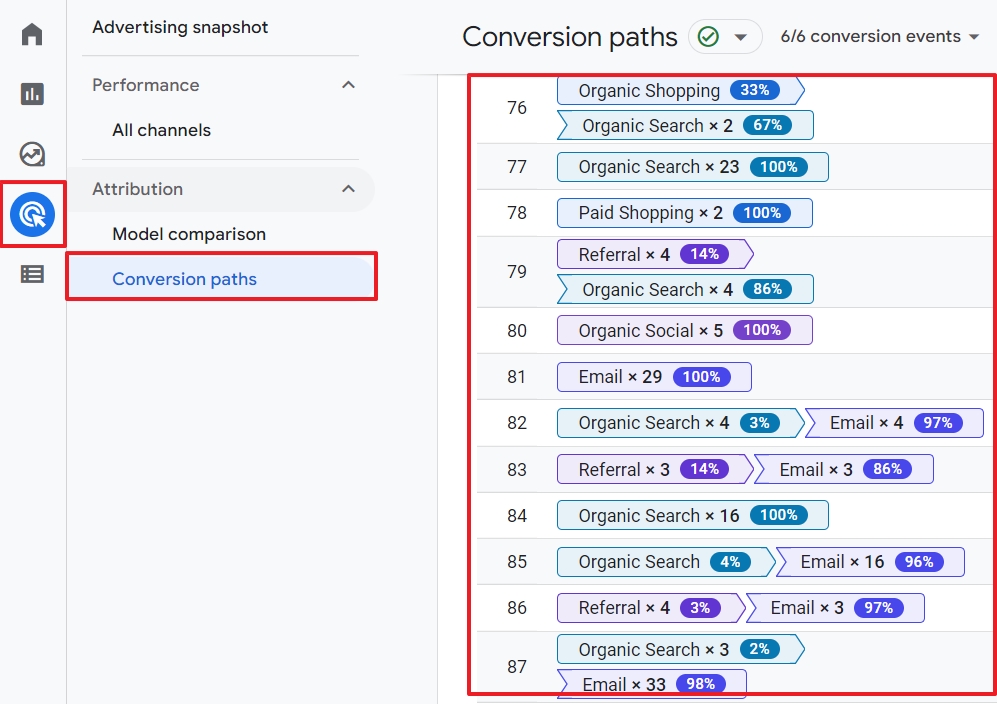
The step most stores skip is reviewing channel grouping — if UTM parameters on email or paid campaigns aren’t tagged consistently, GA4 may misclassify significant traffic as “direct” or “unassigned,” which silently distorts attribution results regardless of how well the underlying model is configured. Attribution configuration is only as accurate as the tagging discipline feeding it.
Why Does UTM Tagging Matter So Much for Accurate Attribution?
UTM parameters are the tagging system that tells GA4 where traffic actually came from, and inconsistent or missing UTM tagging is one of the most common — and most fixable — causes of distorted attribution reporting.
Why this matters so much in practice:
- Untagged links default to “direct” or “unassigned”: an email campaign link without proper UTM parameters gets misclassified, making email appear to drive far less revenue than it actually does.
- Inconsistent naming conventions fragment channel data: “Email,” “email,” and “Newsletter” being used interchangeably across campaigns splits what should be one channel’s data into multiple, harder-to-analyze buckets.
- Paid social and paid search both rely on accurate tagging: without consistent UTM parameters, GA4’s attribution model can’t correctly distinguish organic social engagement from paid campaign traffic.
- SMS and other emerging channels are especially prone to being undertagged, since SMS platforms don’t always default to appending UTM parameters the way many email platforms do.
The fix is establishing a consistent UTM naming convention across every channel — source, medium, and campaign parameters applied uniformly, ideally standardized as a documented internal convention rather than decided ad hoc per campaign. For WooCommerce brands running email, SMS, and paid campaigns simultaneously, this consistency directly determines whether GA4’s attribution reporting reflects reality or significantly undercounts the channels most tightly integrated with the storefront, like lifecycle marketing sends.
When Should You Use a Different Attribution Model Than the Default?
While data-driven attribution works well for most ecommerce stores with adequate conversion volume, there are specific situations where a different model provides more useful or interpretable insight.
Situations that warrant reconsidering the default:
- Low conversion volume: stores without enough conversions for GA4’s machine learning model to train reliably may get more stable, interpretable results from cross-channel last-click, even though it’s a simpler model.
- Long, complex B2B-style sales cycles: if your considered-purchase journey extends well beyond typical ecommerce lookback windows, a longer attribution window matters more than which model is selected.
- Debugging or validating specific channel performance: temporarily switching to first-click or linear attribution can help diagnose whether a particular channel’s contribution looks meaningfully different under different assumptions, which is useful context even if DDA remains the primary reporting model.
- Comparing GA4 attribution against MER: since no single-platform attribution model captures the full picture, cross-referencing GA4’s reported channel performance against blended Marketing Efficiency Ratio helps sanity-check whether the model’s output aligns with actual total revenue trends.
The mistake to avoid is treating attribution model selection as a one-time decision that never needs revisiting. As conversion volume grows, campaign mix shifts, or new channels are added, the attribution model that made sense at launch may no longer be the most useful lens for understanding what’s actually driving revenue.
How Can You Validate That Your GA4 Attribution Setup Is Actually Accurate?
Configuring attribution settings correctly is only half the work — ongoing validation is what confirms the setup is actually reflecting reality rather than silently drifting out of alignment as campaigns and tracking conditions change. Practical validation steps:
- Cross-reference GA4 revenue against WooCommerce Analytics: since WooCommerce records actual completed transactions without sampling or client-side dependency, comparing it against GA4’s reported conversions reveals the scale of any tracking gap.
- Audit the “Unassigned” and “Direct” channel buckets regularly: a disproportionately large or growing unassigned/direct segment is usually a tagging problem, not genuinely untraceable traffic.
- Spot-check campaign-level UTM tagging periodically across email, SMS, and paid channels, since tagging discipline tends to erode over time without active monitoring.
- Use GA4’s DebugView during implementation and after any tracking changes, to confirm events and parameters are firing and being captured as expected before relying on the resulting reports.
- Compare attribution model outputs periodically, checking whether DDA-reported channel performance broadly aligns with what you’d expect given known campaign activity, flagging discrepancies for deeper investigation rather than accepting them at face value.
For WooCommerce brands, this validation work is far more manageable when server-side tracking and a properly maintained Conversions API integration reduce the underlying data gaps that attribution modeling can’t fully compensate for — attribution configuration can only be as accurate as the underlying event data it’s working from.
Ready to take your e-commerce to the next level?
If your GA4 attribution reports don’t match what you intuitively know about which channels drive revenue, the issue is rarely the platform itself — it’s almost always incomplete UTM tagging, an unreviewed attribution window, or default settings that were never adjusted to fit your actual marketing mix. Left unaddressed, this kind of misattribution quietly steers budget toward the wrong channels.
This is exactly the kind of technical gap we help DTC and ecommerce brands close. As an extension of your in-house team, we build data-driven systems where advanced tracking, attribution, and paid media configuration work together — so your GA4 reporting is something you can actually make budget decisions on, not a dashboard you have to second-guess. If you want a clear, validated picture of how your channels are truly performing, book a free marketing automation audit and get a data-driven, conversion-focused review of your attribution setup.



Comments