


If you’ve set up the Meta Pixel and wondered whether the Conversions API is a redundant extra step or a genuinely necessary addition, you’re asking exactly the right question — and the honest answer is that relying on the Pixel alone is no longer sufficient for accurate tracking in most ecommerce setups. Browser-based tracking has become significantly less reliable due to ad blockers, cookie restrictions, and privacy changes, while server-side tracking fills in gaps the Pixel structurally can’t cover. In this article, we’ll break down what the Meta Pixel and Conversions API each actually do, why running them together (with proper deduplication) is the standard for accurate Meta Ads performance, and how to set this up correctly for a WooCommerce store.
What Does the Meta Pixel Actually Do?
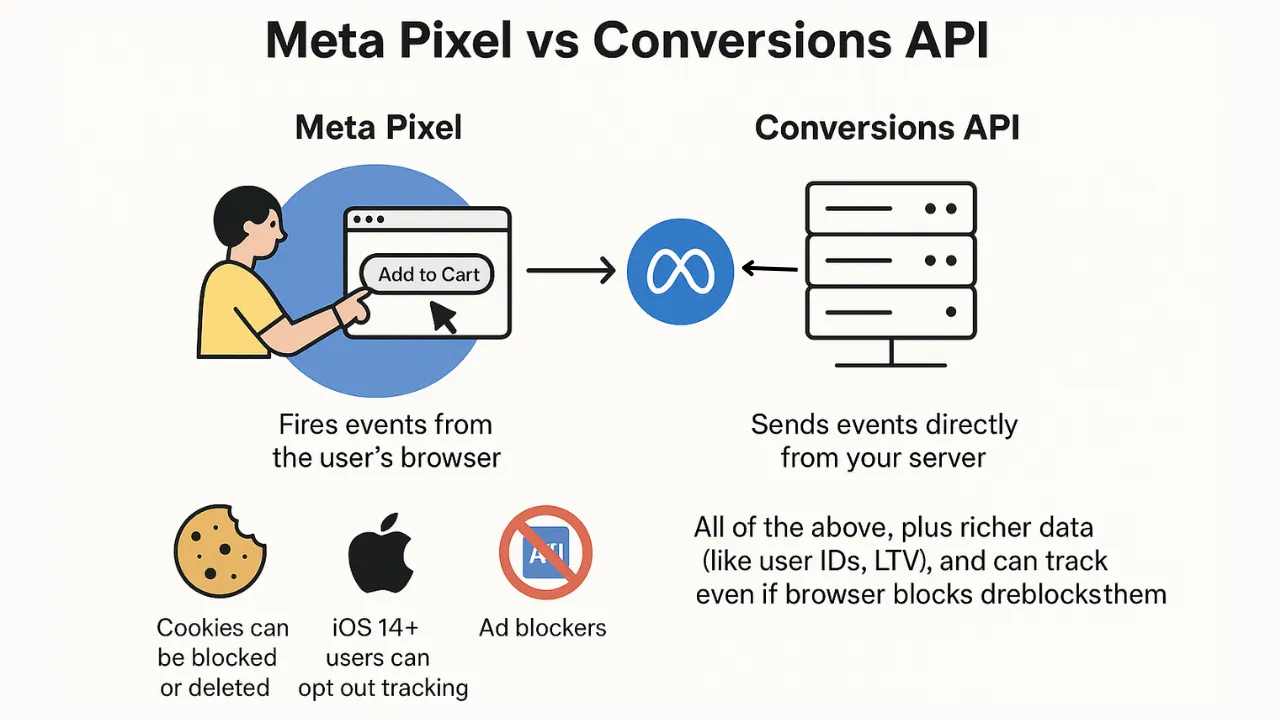
The Meta Pixel is a piece of JavaScript code installed on your website that tracks visitor behavior client-side — in the visitor’s browser — and sends that data to Meta for ad optimization, audience building, and conversion reporting.
How the Pixel functions:
- Browser-based tracking: the Pixel fires directly from the visitor’s browser when they take an action (page view, add to cart, purchase), sending that event data to Meta in real time.
- Cookie-dependent: the Pixel relies on browser cookies (both first-party and, historically, third-party) to track visitors and connect their on-site behavior back to Meta’s ad platform.
- Relatively simple implementation: installing the base Pixel code, plus standard event tracking, is typically straightforward, especially with plugin-based WooCommerce integrations.
- Real-time signal: because it fires directly from the browser during the visitor’s session, Pixel data tends to be immediate, without the processing delay that can occur with some server-side implementations.
The fundamental limitation is that Pixel tracking depends entirely on the browser successfully loading and executing the tracking script, and on cookies persisting long enough to connect behavior across a session. Ad blockers, browser privacy settings (like Safari’s Intelligent Tracking Prevention), and cookie-clearing behavior all interrupt this chain, meaning a meaningful and growing percentage of actual conversions go untracked by the Pixel alone — even when those conversions genuinely happened and originated from a Meta ad.
What Does the Conversions API Do Differently?
The Conversions API (CAPI) sends conversion event data directly from your server to Meta, bypassing the browser entirely — which is precisely what makes it resilient to the tracking obstacles that increasingly limit Pixel-only setups.
Key differences in how it operates:
- Server-side tracking: events are sent from your web server (or a connected system like WooCommerce’s order processing) directly to Meta’s servers, without depending on the visitor’s browser executing any script.
- Not affected by ad blockers: since there’s no client-side script for an ad blocker to detect and block, CAPI events aren’t subject to the same blocking that affects Pixel tracking.
- Not dependent on browser cookie policies: server-side events don’t rely on third-party cookies surviving in the visitor’s browser, making them resilient to increasingly aggressive browser privacy defaults.
- Requires more technical setup: unlike the Pixel’s relatively simple installation, CAPI requires server-side implementation, typically through a plugin, custom integration, or tag management solution configured to send events server-side.
The tradeoff is that CAPI implementation is more involved than Pixel installation, and it requires access to server-side infrastructure or a properly configured integration layer. But the payoff is significant: CAPI captures conversions that the Pixel alone would simply miss, particularly among privacy-conscious users, ad-blocker users, and Safari/iOS traffic where browser-based tracking has become substantially less reliable over recent years.
Why Should You Run Both the Pixel and Conversions API Together?
Running Pixel and CAPI together isn’t redundant — it’s the configuration Meta itself recommends, because each method captures conversions the other structurally misses, and combining them produces meaningfully more complete tracking than either alone.
The complementary strengths:
- Coverage overlap fills gaps: some visitors will be tracked by the Pixel but not CAPI (depending on implementation specifics), while others will be tracked by CAPI but missed by the Pixel due to blockers or cookie restrictions — running both maximizes total conversion capture.
- Improved Event Match Quality: sending the same event through both channels, with proper deduplication, gives Meta more complete customer information parameters to work with, which directly improves match rate and downstream campaign optimization.
- Redundancy against technical failures: if the Pixel fails to fire for any reason (a script conflict, a slow-loading page, a browser extension), CAPI still captures the event, and vice versa in rarer server-side failure scenarios.
- Resilience to continued privacy changes: as browser privacy restrictions continue evolving, having a server-side tracking method already in place means your measurement infrastructure isn’t solely dependent on client-side tracking that faces an uncertain future.
The common misconception is that adding CAPI on top of an existing Pixel setup doubles your reported conversions or inflates numbers artificially. Without proper deduplication, this concern would be valid — but Meta’s deduplication system (explained next) is specifically designed to prevent double-counting when both methods capture the same event, meaning the combined setup improves accuracy without introducing double-reporting into campaign performance data.
How Does Deduplication Prevent Double-Counting Between Pixel and CAPI?
Deduplication is the mechanism that allows Pixel and CAPI to run simultaneously without inflating conversion counts, and understanding how it works is essential to implementing a combined setup correctly.
How the deduplication process works:
- Shared event ID: both the Pixel event and the corresponding CAPI event for the same conversion must include an identical, unique
event_id, which Meta uses to recognize they represent the same underlying action. - Meta’s matching logic: when Meta receives two events with the same
event_idwithin a defined time window, it recognizes them as duplicates and counts the conversion only once in reporting, rather than as two separate events. - Consistent event naming: the event name (e.g., “Purchase,” “AddToCart”) must also match between the Pixel and CAPI versions of the same event for deduplication to function correctly.
- Timing considerations: since Pixel and CAPI events for the same action may arrive at slightly different times (CAPI often has minor processing delay), Meta’s deduplication window accounts for this, but events sent too far apart in time may not deduplicate correctly.
The most common implementation mistake is failing to generate and pass a consistent event_id between the client-side Pixel call and the server-side CAPI call for the same action — without this shared identifier, Meta has no reliable way to recognize the two events as duplicates, resulting in inflated conversion counts that misrepresent actual campaign performance. For WooCommerce stores, this typically means the same order or event ID needs to be passed to both the Pixel (via JavaScript at the point of conversion) and CAPI (via the server-side order processing), which is exactly where a properly configured integration, rather than two independently installed tracking methods, becomes essential.
How Do You Set Up Pixel and Conversions API Together for WooCommerce?
Implementing a properly deduplicated Pixel and CAPI setup for WooCommerce requires coordinating client-side and server-side event firing, rather than treating the two as separate, independently configured tracking methods.
Implementation steps:
- Install the base Meta Pixel on your WooCommerce store, either through a dedicated plugin or manual implementation, ensuring standard events (PageView, AddToCart, Purchase) fire correctly.
- Configure server-side CAPI event forwarding, typically through a plugin that supports both Pixel and CAPI together, or a custom integration that sends order and customer data server-side upon checkout completion.
- Implement shared event IDs across both tracking methods for the same conversion actions, ensuring the deduplication mechanism has what it needs to function correctly.
- Pass customer information parameters through CAPI (hashed email, phone, and other identifiers) to maximize Event Match Quality, since CAPI’s server-side nature allows for more complete parameter passing than client-side Pixel calls typically achieve alone.
- Validate using Meta’s Events Manager test tools, confirming both Pixel and CAPI events are firing for the same actions and that deduplication is functioning correctly before relying on the combined setup for campaign optimization.
- Monitor Event Match Quality and deduplication rates on an ongoing basis, since checkout changes, plugin updates, or shifts in tracking configuration can silently break the coordination between the two methods over time.
The mistake to avoid is installing Pixel and CAPI as two separate, disconnected implementations without ensuring they share event IDs and consistent event data — this technically “has both” but misses the deduplication benefit entirely, risking inflated reporting rather than the more complete, accurate picture a properly coordinated setup provides.
Ready to take your e-commerce to the next level?
If your Meta Ads performance has felt increasingly unpredictable, or you suspect your reported conversions don’t fully reflect what’s actually happening in your WooCommerce store, a Pixel-only setup is very likely part of the problem. Relying on browser-based tracking alone in the current privacy landscape means a meaningful share of real conversions simply aren’t being captured or properly attributed.
This is exactly the kind of technical gap we help DTC and ecommerce brands close. As an extension of your in-house team, we build data-driven systems where advanced tracking, Conversions API integration, and paid media work together — so your Meta Ads reporting reflects what’s actually happening in your store, not a partial, browser-dependent picture. If you want a clear read on how completely your current setup is capturing conversions, book a free marketing automation audit and get a data-driven, conversion-focused review of your tracking infrastructure.


Comments