





Many eCommerce brands operate under the comforting illusion that hiding the unsubscribe link at the bottom of a footer is a clever strategy to protect their list size and maintain revenue. But what if this desperate attempt to retain uninterested subscribers is actually acting as a silent ceiling on your deliverability and revenue expansion? For high-growth businesses, the hidden cost of inaction regarding user experience lies in the mounting spam complaints and declining sender reputation that occur when frustrated customers can’t find a quick exit, ultimately causing mission-critical promotional messages to bypass the inbox entirely.
The hard reality is that in 2026, maximizing Customer Lifetime Value (LTV) requires prioritizing list hygiene over vanity metrics. Embracing the list-unsubscribe header is not a counterintuitive move; it is a strategic necessity that signals legitimacy to major inbox providers like Gmail and Outlook while fostering a high-intent audience. This guide explores how leveraging this native email infrastructure eliminates technical debt and fuels long-term engagement, ensuring your email marketing remains a scalable engine for growth rather than a liability to your domain authority.
What is a list-unsubscribe header in email marketing?
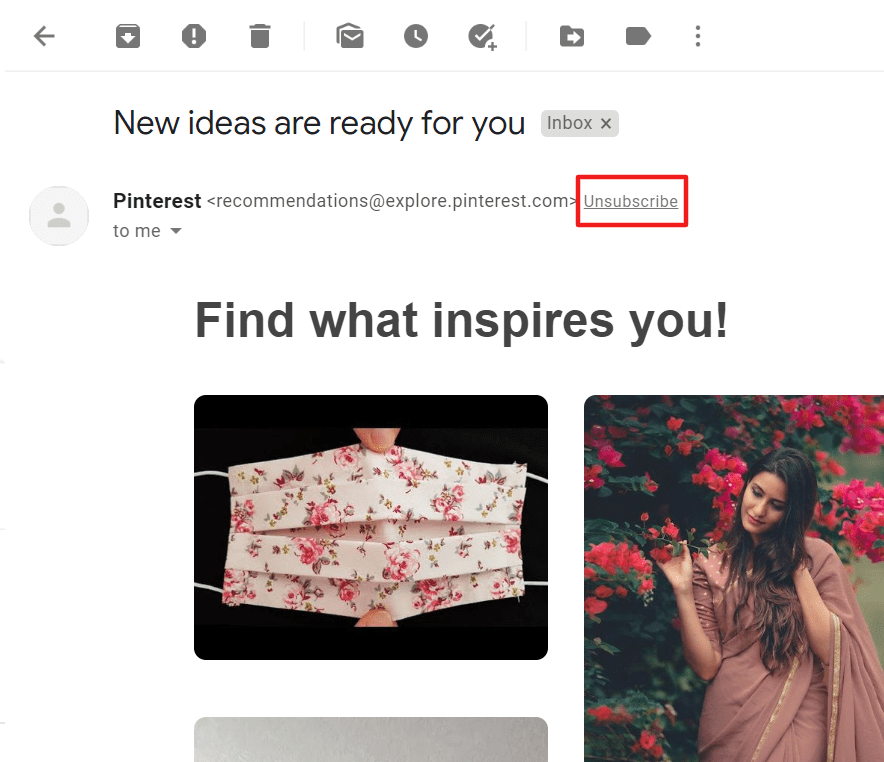
A list-unsubscribe header is a technical command embedded within the metadata of an email that signals to mailbox providers, such as Gmail, Outlook, and Yahoo, how to provide a native unsubscribe button within their own user interface. For WooCommerce brands, this means an “Unsubscribe” link appears at the very top of the message window, allowing recipients to opt-out without having to scroll through the email body or hunt for a hidden link in the footer. While it may seem counterintuitive to make leaving easier, this header is a critical deliverability asset that transforms a potential spam complaint into a clean, reputation-saving exit.
- Mailto Method: This traditional approach sends an automated email back to your server or ESP to trigger the removal process when a user clicks the native button.
- URL Method: This more modern approach directs the inbox provider to a specific landing page or, more effectively, utilizes a one-click POST request to process the unsubscribe instantly without requiring the user to leave their inbox.
Implementing this header is no longer just a best practice for high-growth eCommerce stores; it is a technical requirement for maintaining access to major inboxes. By providing a clear, machine-readable path for disinterested subscribers to leave, you reduce the friction that leads to “Mark as Spam” actions. In the eyes of automated filtering algorithms, a high unsubscribe rate is a manageable preference signal, whereas a spike in spam complaints is a direct threat to your domain authority and future revenue expansion.
Why is the list-unsubscribe header important for email deliverability?
For high-growth WooCommerce brands, the list-unsubscribe header is a critical technical signal that directly influences sender reputation. Major Inbox Service Providers (ISPs) like Gmail and Yahoo prioritize this header because it provides a safe, standardized way for users to opt-out without resorting to the “Report Spam” button. When a user marks an email as spam, it creates a permanent negative mark on your domain reputation; however, utilizing the list-unsubscribe header allows the ISP to handle the request as a clean exit, protecting your deliverability rates.
- Reduction in Spam Complaints: By placing an easy-to-find unsubscribe option at the top of the interface, you significantly lower the likelihood of frustrated users flagging your content as malicious or unwanted.
- Improved Sender Trust: Implementing this header demonstrates to ISPs that you are a legitimate sender following industry best practices, which often results in preferential routing to the primary inbox rather than the promotions or junk folders.
- Positive Engagement Signals: Removing inactive or disinterested subscribers through a frictionless process ensures your engagement metrics—such as open and click-through rates—remain high, signaling to filters that your content is highly relevant to your remaining audience.
From a technical standpoint, failing to include this header in your WooCommerce transactional and marketing flows is a structural risk to your revenue. Modern deliverability requirements now mandate easy unsubscription methods for high-volume senders. By embracing transparency in your opt-out process, you secure a healthier, more engaged email list that ultimately drives higher Customer Lifetime Value (LTV) and ensures your mission-critical communications reach the inbox without interference.
How to implement a list-unsubscribe header in WooCommerce?
Implementing a list-unsubscribe header in WooCommerce is a technical necessity for maintaining high deliverability rates, especially following the 2024 sender requirements from Google and Yahoo. Because WordPress does not natively support advanced email headers, high-growth brands must bridge this gap by moving away from standard server-side mailing (wp_mail) toward a dedicated email service provider (ESP) and a robust SMTP plugin. This ensures that the required metadata is injected into every outgoing marketing or transactional message without requiring custom PHP development.
- SMTP Plugin Integration: Install a professional SMTP plugin like WP Mail SMTP to override the default WordPress mail function. This serves as the configuration layer that allows your WooCommerce store to communicate effectively with external mail servers while supporting custom header fields.
- ESP Configuration: Connect your store to a reputable ESP such as Brevo, SendGrid, or Amazon SES. Most modern providers automatically generate the List-Unsubscribe and List-Unsubscribe-Post headers (RFC 8058) by default, provided you are sending through their specialized marketing or transactional APIs.
- DNS and Compliance Validation: Ensure your SPF, DKIM, and DMARC records are correctly aligned with your chosen provider. Once active, use a deliverability testing tool to verify the presence of the header; a successful implementation will show a one-click unsubscribe option near the sender’s name in major inbox providers like Gmail.
By centralizing your email infrastructure through an API-based service rather than local hosting, you automate the management of these critical headers. This proactive technical setup not only protects your sender reputation from being damaged by high spam complaint rates but also provides a seamless experience for customers, ultimately reinforcing the long-term health of your WooCommerce distribution list.

What are the benefits of list-unsubscribe vs. spam complaints?
For high-growth WooCommerce brands, the distinction between an unsubscribe request and a spam complaint is the difference between a healthy list pruning and a catastrophic blow to your sender reputation. When a recipient can’t find an easy way to opt-out, they often resort to the “Report Spam” button, which signals to Inbox Service Providers (ISPs) like Gmail and Outlook that your content is unsolicited. A list-unsubscribe header proactively prevents this by offering a native, highly visible exit path at the top of the email client interface.
- Reputation Protection: Unlike spam complaints, which directly lower your sender score and cause future emails to be throttled, list-unsubscribes are viewed by ISPs as a sign of a responsible sender who respects user preferences.
- Data Accuracy: Spam complaints often result in “silent” blocks where you continue sending to an address that will never see your mail; a list-unsubscribe provides a clean programmatic trigger to update your WooCommerce database immediately.
- Deliverability Optimization: By reducing the friction of opting out, you ensure your remaining audience consists of high-intent subscribers, which improves your aggregate open and click-through rates—key metrics that ISPs use to prioritize your placement in the primary inbox.
Implementing the list-unsubscribe header transforms a potential technical liability into a strategic advantage for your WooCommerce store. While losing a subscriber might feel counterproductive to growth, the reality is that high-volume spam complaints create a “silent ceiling” on your revenue by ensuring even your most loyal customers eventually stop seeing your transactional and promotional messages. Choosing to facilitate a “clean break” through the header preserves your technical infrastructure for the customers who actually drive your bottom line.
How does the list-unsubscribe header improve revenue growth?
In the high-stakes environment of WooCommerce growth, the list-unsubscribe header acts as a critical safeguard for your sender reputation, which is the ultimate currency of email marketing. While it may seem counterintuitive to simplify the exit for subscribers, a seamless unsubscribe process directly prevents users from clicking the “Report Spam” button. Each spam complaint signals to ISPs like Gmail and Outlook that your content is unsolicited, leading to a downward spiral in deliverability that ensures even your highest-intent customers never see your revenue-driving promotional offers.
Implementing a list-unsubscribe header transforms your list hygiene from a manual chore into an automated engine for ROI optimization by focusing on the following growth levers:
- Deliverability Protection: By providing a low-friction alternative to spam reports, you maintain a clean sender reputation, ensuring your mission-critical abandoned cart and win-back sequences reach the primary inbox.
- Engagement Rate Optimization: Removing unengaged contacts who no longer find value in your brand improves your core metrics, such as open and click-through rates, which are key algorithmic signals used by ISPs to prioritize your mail.
- Strategic List Resilience: A transparent exit builds brand trust and ensures that your marketing spend is focused exclusively on a high-intent audience that is statistically more likely to convert, rather than vanity metrics that mask underlying retention issues.
Ultimately, the business reality for scaling WooCommerce stores is that a smaller, hyper-engaged list is significantly more profitable than a bloated database plagued by low inbox placement. By embracing the list-unsubscribe header, you remove technical bottlenecks that stall revenue expansion and ensure your communication infrastructure is built for long-term technical resilience.
Ready to take your e-commerce to the next level?
While mastering the technical nuances of the list-unsubscribe header is a vital step for maintaining sender reputation, the business reality for high-growth WooCommerce brands is that deliverability without a retention strategy is a silent drain on your margins. If your email efforts feel like they are stalling revenue expansion, or if you suspect that a bloated list of disengaged subscribers is eroding your domain authority, you are facing a structural barrier to scale. For a performance-driven brand, an easy exit for the wrong customer is not a loss; it is a necessary mechanism to ensure your high-intent messages reach the inbox, ultimately protecting your long-term profitability and Customer Lifetime Value (LTV).
To move beyond basic technical compliance and build a high-performance communication engine, you need a partner that treats your technical backend as a strategic asset for growth. We act as an extension of your team, helping DTC brands maximize Profit, Retention, and LTV through data-driven systems where CRM, automation, and advanced tracking operate in perfect concert. Our process begins with rigorous, conversion-focused audits to eliminate guesswork and identify the exact technical and strategic bottlenecks in your customer journey. If you are ready to transform your email infrastructure into a scalable revenue driver that maximizes ROAS, book a free marketing automation audit today.