


If your WooCommerce store loads noticeably slower for customers in certain regions, or your hosting provider has recommended a CDN without much explanation of what it actually does, you’re not alone — content delivery networks are one of the most misunderstood pieces of ecommerce infrastructure, despite being one of the simpler performance fixes available. In this article, we’ll break down what a CDN actually is, how it mechanically improves website performance and load times, and what WooCommerce store owners specifically need to know before implementing one.
What Is a CDN and How Does It Actually Work?
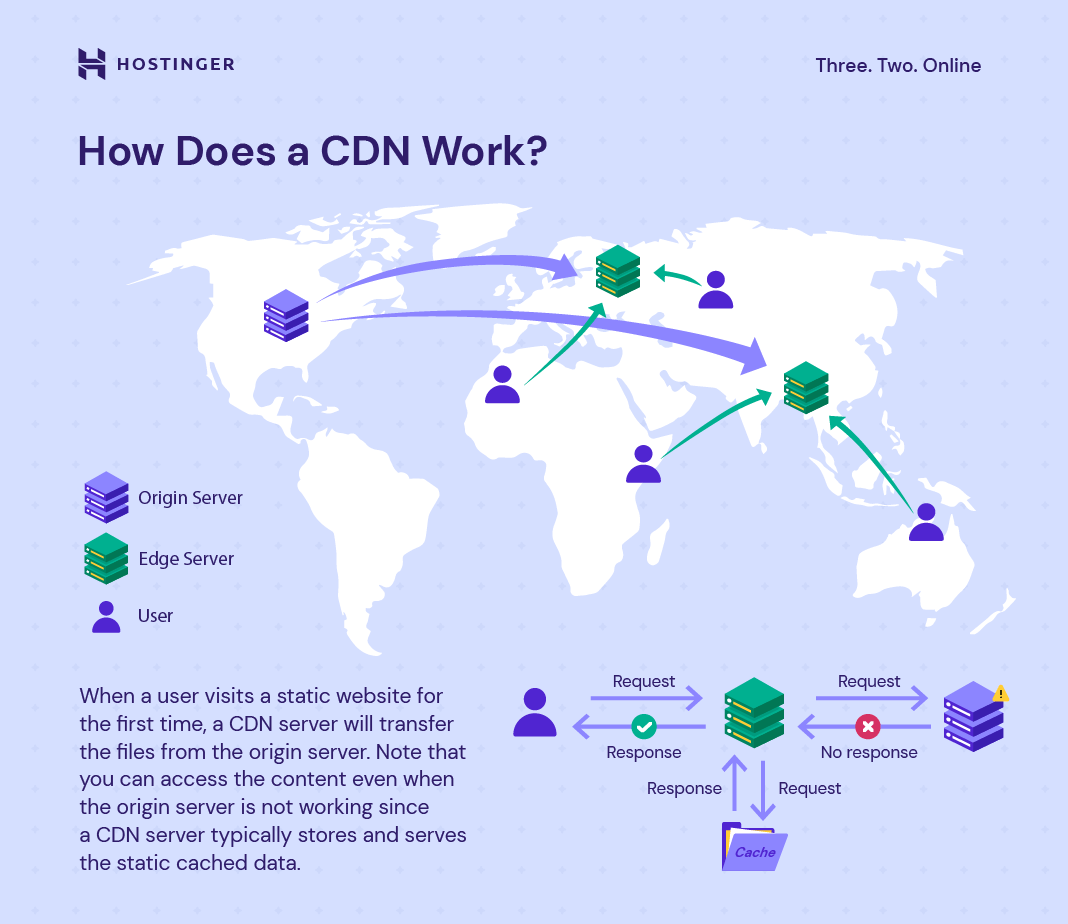
A Content Delivery Network (CDN) is a distributed network of servers positioned in multiple geographic locations that store cached copies of your website’s static content, so visitors load that content from a server physically closer to them rather than from your site’s single origin server. The basic mechanics:
- Origin server: your website’s primary hosting location, where the original files live.
- Edge servers (or points of presence): geographically distributed servers that store cached copies of your static content — images, CSS, JavaScript, and other assets that don’t change per-request.
- Request routing: when a visitor loads your site, the CDN automatically routes their request to the nearest edge server rather than the origin, reducing the physical distance data has to travel.
- Cache refresh: edge servers periodically sync with the origin server to ensure cached content stays current, following rules you or your CDN provider configure.
The core value proposition is straightforward: physical distance directly affects load time, since data has to travel from server to browser regardless of connection speed. A customer in Australia loading a site hosted on a US server experiences meaningfully more latency than a customer loading the same site from a CDN edge server located in their own region. For WooCommerce stores serving customers across multiple countries or regions, this distance-related latency is often a bigger performance factor than most store owners realize, since it applies to every single asset the page loads, not just the initial page request.
How Does a CDN Actually Improve Website Load Times?
A CDN improves load times through several distinct mechanisms working together, not just through geographic proximity alone — understanding each one clarifies why CDN implementation tends to produce measurable, not marginal, performance gains.
The specific performance mechanisms:
- Reduced latency through geographic proximity: serving content from a nearby edge server cuts the physical distance data travels, directly reducing load time regardless of connection quality.
- Reduced origin server load: since cached static assets are served from edge locations rather than the origin, your primary server handles fewer requests, freeing up capacity for dynamic content like cart and checkout operations that can’t be cached the same way.
- Traffic spike absorption: during sales events or traffic surges, a CDN’s distributed infrastructure absorbs load that would otherwise overwhelm a single origin server, reducing the risk of slowdowns or downtime at exactly the moment revenue is most at stake.
- Compression and optimization: many CDN providers apply automatic compression (like Gzip or Brotli) and modern image format conversion, further reducing the size of assets being delivered without requiring manual optimization work.
The cumulative effect of these mechanisms is more significant than any single one in isolation — a CDN doesn’t just make individual asset requests faster, it changes how your entire infrastructure handles load under both normal and peak-traffic conditions. This is particularly relevant for WooCommerce stores running promotional campaigns or seasonal sales, where a sudden traffic spike without CDN protection can slow or even crash a site at the exact moment conversion opportunity is highest.
Why Does a CDN Matter Specifically for WooCommerce Stores?
WooCommerce stores have specific performance characteristics that make CDN implementation particularly valuable compared to simpler, mostly-static websites.
The WooCommerce-specific factors:
- Heavy reliance on product imagery: ecommerce sites typically serve significantly more images per page than content sites, and product photography is often high-resolution, making image delivery speed a disproportionately large factor in overall load time.
- Geographically distributed customer bases: unlike many local service businesses, ecommerce stores frequently serve customers across multiple countries or regions, making geographic latency reduction directly relevant rather than a marginal edge case.
- Traffic spikes during sales events: Black Friday, seasonal promotions, and flash sales create sudden traffic surges that a single origin server, especially on shared hosting, often struggles to handle without a CDN’s load-absorbing capacity.
- Dynamic and static content mix: WooCommerce pages combine cacheable static assets (images, CSS, JS) with dynamic, per-user content (cart contents, account data) — a properly configured CDN needs to correctly distinguish between what can be cached and what must always be served fresh.
The common mistake WooCommerce store owners make is assuming a CDN alone solves all performance problems, when in reality it addresses static asset delivery specifically — it doesn’t fix underlying issues like plugin bloat, inadequate hosting, or an unoptimized database, all of which continue to affect dynamic page generation regardless of CDN implementation. A CDN is a genuinely valuable piece of the performance stack, but it works best as one component of a broader optimization approach, not a standalone fix.
Can a CDN Improve SEO Rankings, Not Just Load Time?
Yes, indirectly — since site speed is a confirmed factor in Google’s ranking algorithm through Core Web Vitals, and a CDN is one of the more effective infrastructure-level ways to improve the specific speed metrics search engines evaluate.
The connection between CDN implementation and SEO:
- Largest Contentful Paint (LCP) improvement: since LCP often depends on how quickly the largest visible element (frequently a product image) loads, a CDN’s faster asset delivery directly improves this specific, weighted ranking factor.
- Reduced server response time: a CDN reduces Time to First Byte in many cases by serving content from a geographically closer location, which contributes to overall page speed scoring.
- More consistent performance across regions: since Google evaluates page experience signals that can vary by user location, a CDN helps ensure consistent load times for visitors regardless of where they’re browsing from, rather than only optimizing for visitors near your origin server.
- Better crawl efficiency: faster page loads mean Googlebot can crawl more pages within its allocated crawl budget, which matters particularly for larger WooCommerce catalogs with many product and category pages.
The distinction worth understanding is that a CDN improves SEO indirectly, through its effect on Core Web Vitals and overall site speed, rather than being a direct ranking signal in its own right. It’s a genuinely effective lever for the technical SEO side of ecommerce, but it works best paired with the other speed optimizations — image compression, plugin auditing, proper hosting — that address the parts of performance a CDN alone can’t fix.
How Do You Choose and Set Up a CDN for a WooCommerce Store?
Implementing a CDN for WooCommerce involves a few key decisions that affect both performance outcomes and how much ongoing maintenance the setup requires.
Practical implementation considerations:
- Choose a CDN provider suited to ecommerce: options range from CDN features bundled into managed WooCommerce hosting to standalone CDN services, each with different levels of WooCommerce-specific configuration and cache-exclusion handling.
- Configure cache exclusions correctly: cart, checkout, and account pages must be excluded from aggressive caching, since serving a cached version of these dynamic, per-user pages can cause serious functional issues (like showing one customer’s cart to another).
- Set appropriate cache expiration rules: product images and static assets can generally be cached for longer periods, while pages more likely to change frequently (like a homepage featuring current promotions) need shorter cache lifespans.
- Test thoroughly after implementation: verify cart functionality, checkout flow, and account pages behave correctly post-CDN setup, since caching misconfigurations are one of the most common sources of ecommerce-specific bugs after CDN implementation.
- Monitor performance impact: use Core Web Vitals and real user monitoring data before and after implementation to confirm the CDN is delivering the expected speed improvement, rather than assuming it’s working correctly by default.
The mistake to avoid is treating CDN setup as a simple plugin activation with no further attention needed. WooCommerce’s mix of static and dynamic content requires deliberate cache configuration, and a poorly configured CDN can introduce functional bugs (like checkout errors) that are far more damaging to revenue than the slow load times it was meant to fix.
Ready to take your e-commerce to the next level?
If your store’s load times vary dramatically by customer location, or you’ve watched a sales event traffic spike slow your site down at the worst possible moment, a CDN addresses exactly that kind of infrastructure gap — but it’s rarely a complete fix on its own. Speed problems compound across every channel driving traffic to your store, which means infrastructure decisions like this one have a direct line to both search visibility and revenue.
This is exactly the kind of technical gap we help DTC and ecommerce brands close. As an extension of your in-house team, we build data-driven systems where technical performance, tracking, and conversion optimization work together — so infrastructure improvements like CDN implementation translate into measurable gains in speed, rankings, and revenue. If you want a clear picture of where performance is actually costing you traffic and conversions, book a free marketing automation audit and get a data-driven, conversion-focused view of what’s really happening.

Comments