

The health of your eCommerce storefront is often judged by the speed of its checkout, yet a more fundamental metric lies in how efficiently your site communicates with Google’s primary indexer. When technical barriers prevent Googlebot from effectively crawling your product pages, you aren’t just losing visibility; you are forfeiting the chance to capture high-intent customers at the moment they are searching for your solutions. Overlooking the mechanics of web crawling creates a persistent revenue leak that even the most aggressive paid media strategy cannot fully plug.
Understanding the operational logic of Googlebot is a strategic prerequisite for any brand aiming to dominate organic search and improve long-term retention. By aligning your technical infrastructure with the way this evergreen crawler perceives and processes your site, you ensure that every update and new product launch is immediately recognized and ranked. This guide provides the clarity needed to navigate the nuances of user agents and crawl budgets, transforming a backend technicality into a primary driver of sustainable growth.
What is Googlebot and how does it work?
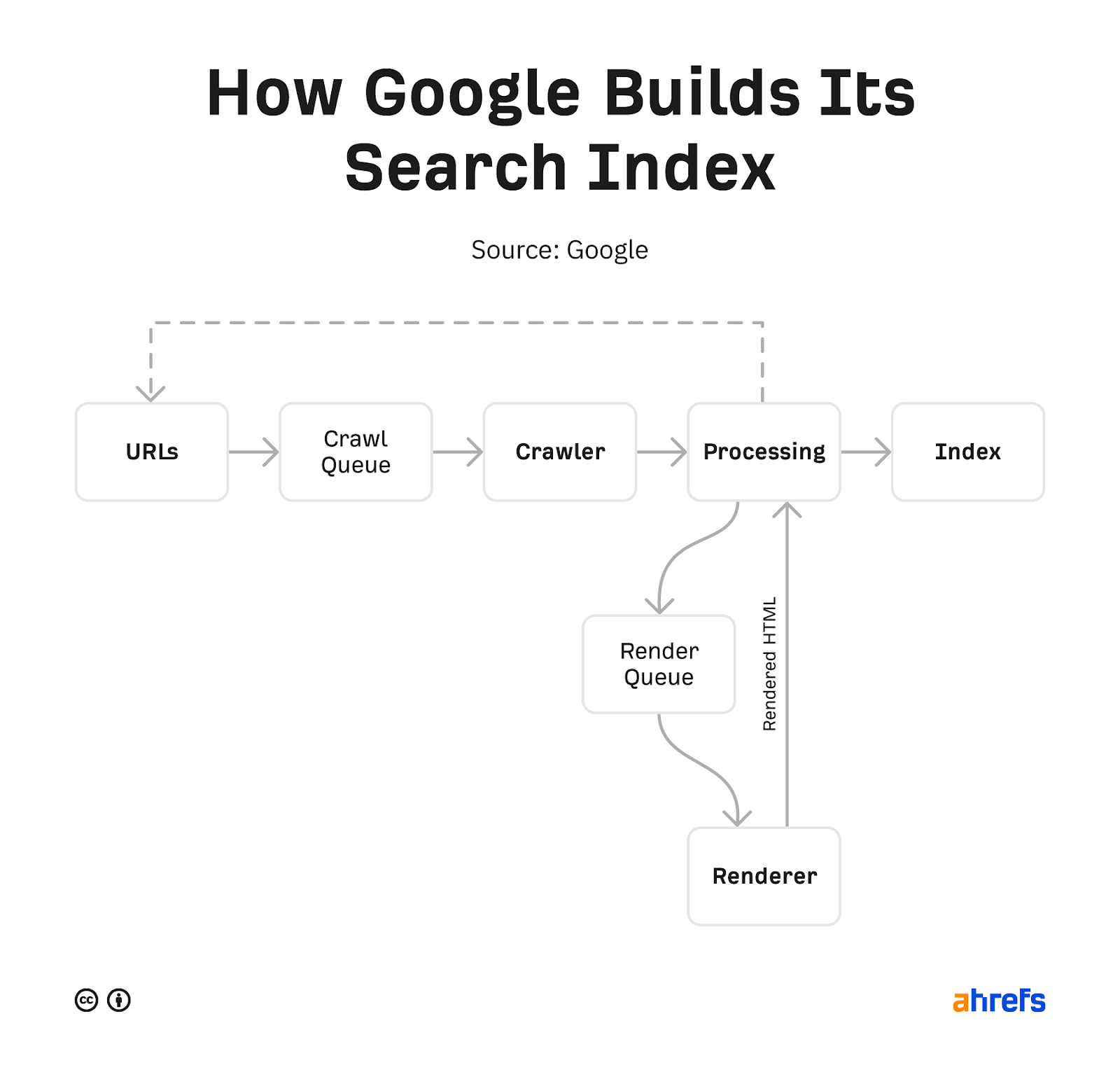
Googlebot is the primary web crawling software used by Google to discover, render, and index pages for its search engine. For WooCommerce store owners, understanding this bot is critical because it functions as an “evergreen” browser, utilizing the latest version of the Chromium engine to view your site exactly as a modern user would. By running on thousands of machines, Googlebot identifies itself through specific user-agent strings, allowing it to navigate your product catalogs and category pages to build a searchable map of your inventory.
- Crawling: The bot discovers new and updated pages by following links or processing sitemaps, determining the priority and speed of these visits to avoid overwhelming your server.
- Rendering: Googlebot executes JavaScript and loads CSS to see the full visual layout of your eCommerce store, ensuring that dynamic content like product reviews or related items are correctly captured.
- Indexing: After processing the rendered content, the information is added to Google’s massive database, making your products eligible to appear in relevant search results.
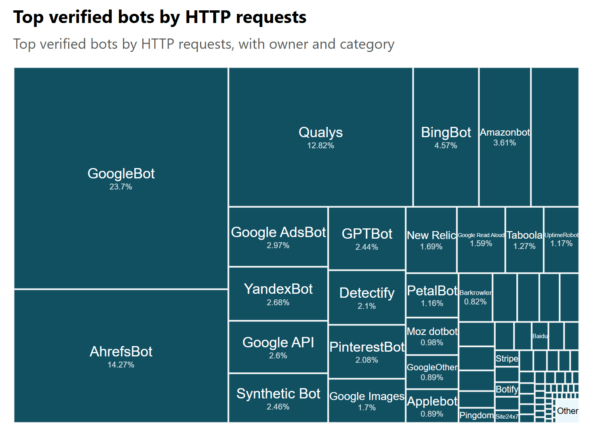
As the most active crawler on the web, accounting for nearly 24% of all “good bot” HTTP requests, Googlebot operates with a level of efficiency that far outpaces competitors like Bingbot. This high frequency means your store’s technical health—specifically its ability to handle rapid requests without latency—is a direct factor in how quickly your new product launches or price updates are reflected in the search index. For a high-growth brand, ensuring Googlebot can seamlessly access your backend infrastructure is the baseline for all subsequent SEO and revenue expansion efforts.
Why is Googlebot important for WooCommerce SEO?
For high-growth WooCommerce stores, Googlebot is the gatekeeper of your organic revenue. As Google’s primary web crawler, its ability to discover, download, and render your product pages is a prerequisite for appearing in search results. Without successful crawling, your pages cannot be indexed, meaning even the most optimized product descriptions or competitive prices will remain invisible to potential customers. For an eCommerce brand, Googlebot’s “evergreen” nature—meaning it renders pages using the latest Chrome engine—is critical for ensuring that interactive elements like product galleries and customer reviews are processed accurately.
- Indexation and Visibility: Googlebot discovers new products and updates to existing ones by following links; if it cannot crawl your site, your inventory won’t appear in SERPs, leading to zero organic traffic.
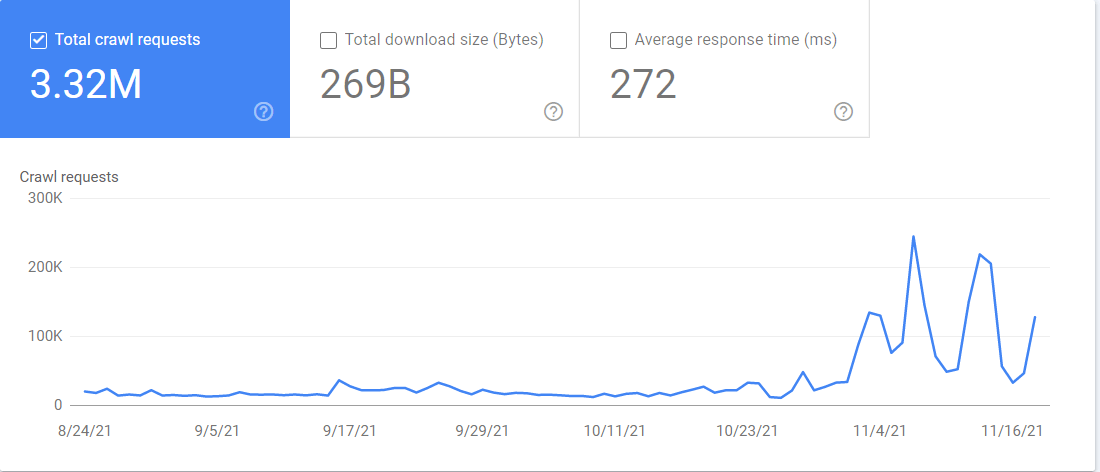
- Crawl Budget Management: Because Googlebot determines how fast and what to crawl based on your server capacity, maintaining a high-performance WooCommerce environment ensures more of your deep-level product pages are reached before resources are exhausted.
- Specialized Discovery: Beyond standard web search, specialized crawlers like Googlebot Image and Googlebot Video are essential for surfacing your product media in high-intent discovery areas like Google Images.
Understanding Googlebot’s behavior is a technical necessity for scaling a WooCommerce store. Because Googlebot is the most active crawler on the web, accounting for nearly 24% of all requests from “good bots,” your server infrastructure must be robust enough to handle its frequent visits without impacting the user experience for human shoppers. By optimizing your site for efficient crawling, you reduce “indexation friction,” ensuring that time-sensitive seasonal launches or price updates are reflected in search results at the exact moment of peak customer intent.
How to optimize your eCommerce site for Googlebot crawling?
Optimizing your WooCommerce store for Googlebot is a technical necessity for ensuring that your product pages and high-intent categories are indexed accurately and updated frequently. Because Googlebot is evergreen and renders pages using the latest stable Chromium, your site must deliver a clean, fast experience that allows the crawler to parse your content without hitting performance bottlenecks or rendering errors. For high-growth eCommerce brands, crawl efficiency directly impacts how quickly new inventory or price updates are reflected in search results.
- Performance and Speed: Prioritize minimizing Time to First Byte (TTFB) and optimizing Core Web Vitals, as Googlebot may deprioritize or ignore pages that load too slowly. Utilizing server-side caching and a Content Delivery Network (CDN) ensures the bot can fetch resources efficiently without overwhelming your server.
- Sitemap Management: Create and submit a comprehensive XML sitemap via Google Search Console to provide a clear roadmap of your site’s architecture. This is especially critical for large WooCommerce stores with deep pagination or complex category structures.
- Structured Data Implementation: Use schema markup to help Googlebot understand specific product attributes like price, availability, and reviews. This technical bridge improves the bot’s ability to categorize your content and enhances your visibility through rich snippets in search results.
Beyond these primary technical fixes, maintaining a clean internal link structure is vital for helping Googlebot discover new pages programmatically. By reducing code bloat through the minification of CSS and JavaScript, you lower the resource cost for Googlebot to render your site, effectively increasing your crawl budget and ensuring that your most valuable revenue-driving pages are always prioritized for indexing.
What are the different types of Google web crawlers?
While Googlebot is the primary umbrella term for Google’s indexing engine, it actually operates through several specialized crawlers, each identifying itself with a unique user-agent string. For WooCommerce store owners, understanding these distinctions is critical because different crawlers prioritize different types of content, from product images to video demonstrations. Google has shifted toward mobile-first indexing, meaning the mobile crawler is now the primary agent used to determine your store’s ranking and search visibility.
- Googlebot Smartphone: This is the primary mobile crawler that simulates a user on a mobile device, ensuring your responsive design and mobile-optimized content are indexed correctly.
- Googlebot Desktop: A secondary crawler used to discover content from a desktop perspective, though for most sites, it makes up a minority of the total crawl requests.
- Googlebot Image: A specialized agent that discovers and indexes the product photos and infographics across your site to power Google Image Search results.
- Googlebot Video: This crawler focuses on crawling, indexing, and ranking your video content, such as product tutorials or reviews, specifically for Google Video search.
- Google AdsBot: Unlike the organic crawlers, this agent analyzes the quality and relevance of web pages containing Google Ads to determine landing page experience.
Efficiently managing these crawlers is essential for maintaining a healthy “crawl budget,” as they run simultaneously across thousands of machines to keep the global index up to date. Since all these specialized agents identify as “evergreen,” they process your WooCommerce store using the latest version of the Chromium rendering engine, allowing them to support modern features like JavaScript-heavy product filters and lazy-loaded images. By ensuring your robots.txt file and site architecture are optimized for these various agents, you facilitate faster indexing and better visibility across all Google search surfaces.
How does Googlebot impact eCommerce revenue growth?
For high-growth WooCommerce stores, Googlebot is the primary bridge between your product catalog and the organic search revenue that sustains long-term growth. Its ability to efficiently discover and index your pages directly dictates how quickly new product launches or seasonal price updates appear in Search Engine Results Pages (SERPs). If technical bottlenecks like slow server response times or poor internal linking impede Googlebot, you risk a “crawl delay” that leaves potential revenue on the table during critical high-intent shopping windows.
To maximize the commercial impact of Googlebot’s visits, store owners should focus on these three critical performance levers:
- Crawl Frequency and Discoverability: While crawl rate is not a direct ranking factor, a higher frequency ensures that your latest inventory and content updates are eligible to rank and drive traffic almost immediately.
- Mobile-First Indexing and Rendering: As an evergreen crawler using the latest Chrome engine, Googlebot evaluates your store based on its mobile performance and visual stability; failing this assessment can lead to diminished visibility and lower trust-based conversion rates.
- Crawl Budget Optimization: For large eCommerce sites, reducing technical clutter—such as duplicate content or broken links—allows Googlebot to focus its limited resources on high-value product pages that directly contribute to your bottom line.
Ultimately, a store optimized for Googlebot is one that is also optimized for user experience. By ensuring your site loads quickly and provides a clear path for crawlers, you simultaneously reduce bounce rates and build the digital authority necessary to capture a larger share of the market.
Ready to take your e-commerce to the next level?
While understanding the mechanics of Googlebot is a technical necessity, the business reality for high-growth WooCommerce brands is that crawlability without a conversion strategy is merely a vanity metric. If your organic visibility is increasing but your revenue expansion feels stalled, or if you suspect that technical bottlenecks are preventing Google from indexing your highest-margin products, you are facing a structural barrier to scale. Relying on basic SEO assumptions or unoptimized site architecture is a direct compromise of your ability to capture intent-driven traffic at the exact moment it should be converting into Profit and Customer Lifetime Value (LTV).
To move beyond basic indexing and build a high-performance eCommerce engine, you need a partner that synchronizes your technical infrastructure with your broader growth objectives. We act as a strategic extension of your team, helping DTC brands maximize Retention and ROAS through data-driven systems where advanced tracking, CRM automation, and paid media operate in perfect concert. Our process begins with rigorous, conversion-focused audits to eliminate guesswork and identify the precise leaks in your customer journey. If you are ready to transform your technical foundation into a scalable revenue driver, book a free consultation today.


Comments