


Scaling an eCommerce store often feels like a battle against invisible technical debt that quietly erodes your search visibility. One of the most overlooked risks in high-growth environments is the breakdown of technical signals, specifically when Google begins overriding your own indexing preferences. When the Google-selected canonical differs from your user-declared one, it is rarely a random glitch; it is a clear indication that your site’s structural signals are conflicting, often due to overlapping product content or delayed internationalization efforts.
For a brand aiming to dominate competitive search landscapes, these discrepancies are more than just technical errors in a Search Console report. They represent a fragmentation of your link equity and a loss of control over which landing pages your customers actually see. Resolving this requires moving beyond basic tagging to ensure every internal link and site architecture signal aligns perfectly with your revenue-driving URLs. This guide breaks down the root causes of canonical misalignment and provides the strategic framework needed to restore your site’s authority and indexing precision.
What is “Duplicate, Google chose different canonical than user”?
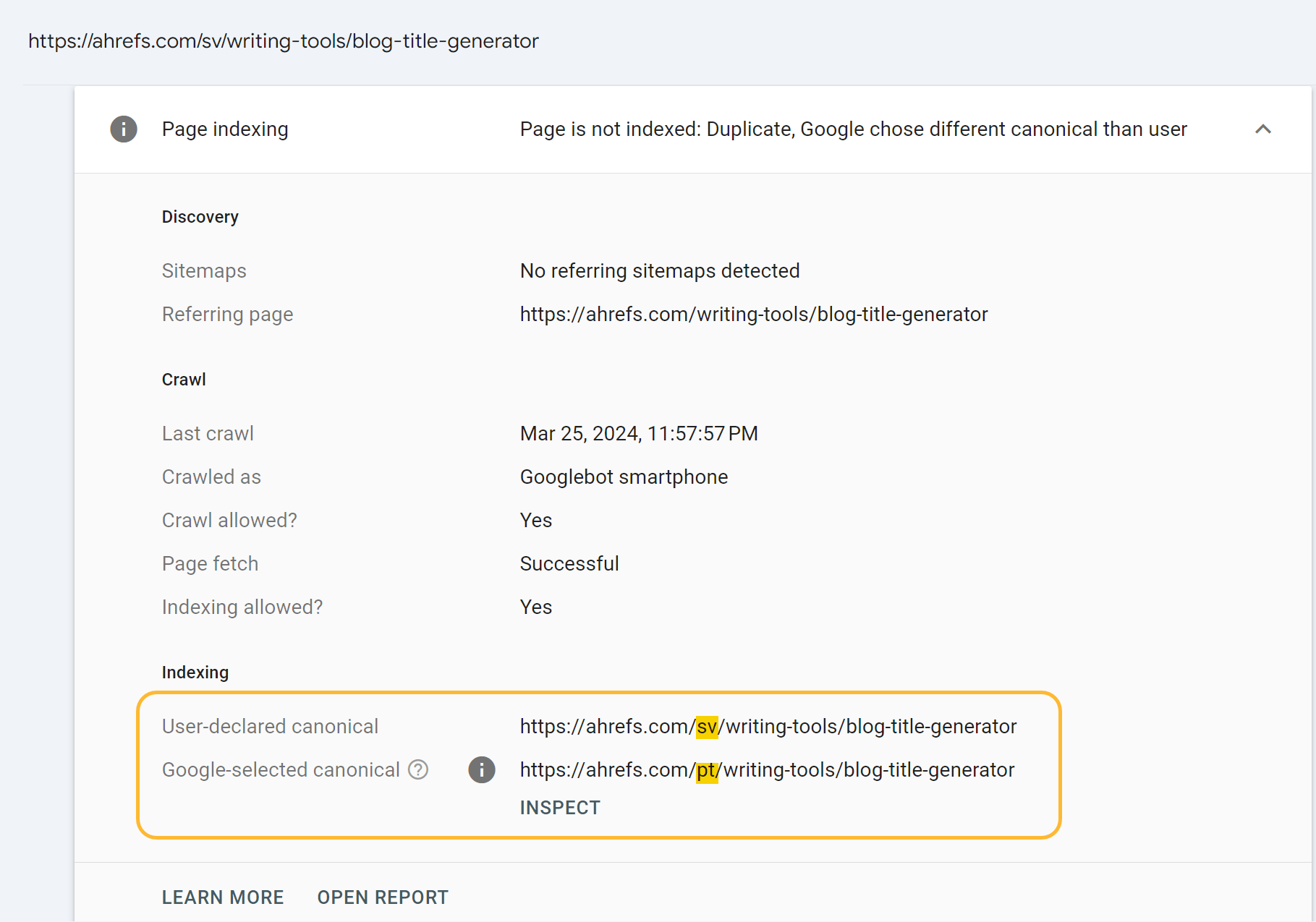
The Google Search Console status “Duplicate, Google chose different canonical than user” indicates a direct conflict between your preferred URL and Google’s algorithmic choice. While you have utilized a canonical tag to signal which version of a page should be indexed, Google has ignored this hint because it identified another URL—or a group of nearly identical pages—as more representative or authoritative. For WooCommerce stores, this often occurs when technical configurations like product variations, tracking parameters, or untranslated staging content create substantial overlap in the eyes of search crawlers.
- The Conflict: You have defined a specific URL as the primary version using a rel=’canonical’ tag, but Google’s automated programs have bypassed this signal during the indexing stage.
- The Trigger: Google finds two or more pieces of content on your site that are very similar or identical, leading it to select its own version to index instead of yours.
- The Result: The page you intended to rank is not indexed, which can lead to keyword cannibalization or wasted crawl budget on low-value URLs.
From a growth perspective, this error is a signal that your site’s architecture is sending mixed signals to search engines. If Google perceives that 60% of the web is duplicate content, your goal as a high-growth brand is to ensure your unique product and category pages are not part of that statistic due to technical oversights like delayed translation processes or unmanaged URL parameters. Resolving this mismatch is critical for protecting your store’s authority and ensuring that your most valuable, high-intent pages are the ones reaching the search results.
Why does Google ignore my canonical tags in WooCommerce?
Google views canonical tags as hints rather than absolute directives, and in the complex environment of a WooCommerce store, conflicting signals often lead the algorithm to override your manual selections. When Googlebot encounters multiple URLs with near-identical content—such as product variations, filtered category views, or untranslated pages—it performs a consolidation check to determine the most authoritative version. If your technical implementation provides inconsistent information, such as listing a URL in your XML sitemap while canonicalizing it elsewhere, Google’s confidence in your tags drops, causing it to choose its own indexed version.
For high-growth stores, these discrepancies are frequently rooted in the technical architecture of the site or the timing of content updates. To ensure Google respects your intended canonicals, you must align these critical signals:
- Content Uniqueness: If a product variation or translated page contains the exact same text as the parent or original version, Google will consolidate them into a single URL to save crawl budget.
- Sitemap Consistency: Including a non-canonical URL in your XML sitemap creates a “Sitemap Paradox,” where you are simultaneously telling Google the page is vital for indexing and that it should point to another source.
- Internal Linking Structure: Google prioritizes URLs that receive the most internal link equity; if you canonicalize to version A but consistently link to version B in your navigation or filter menus, Google will likely favor version B.
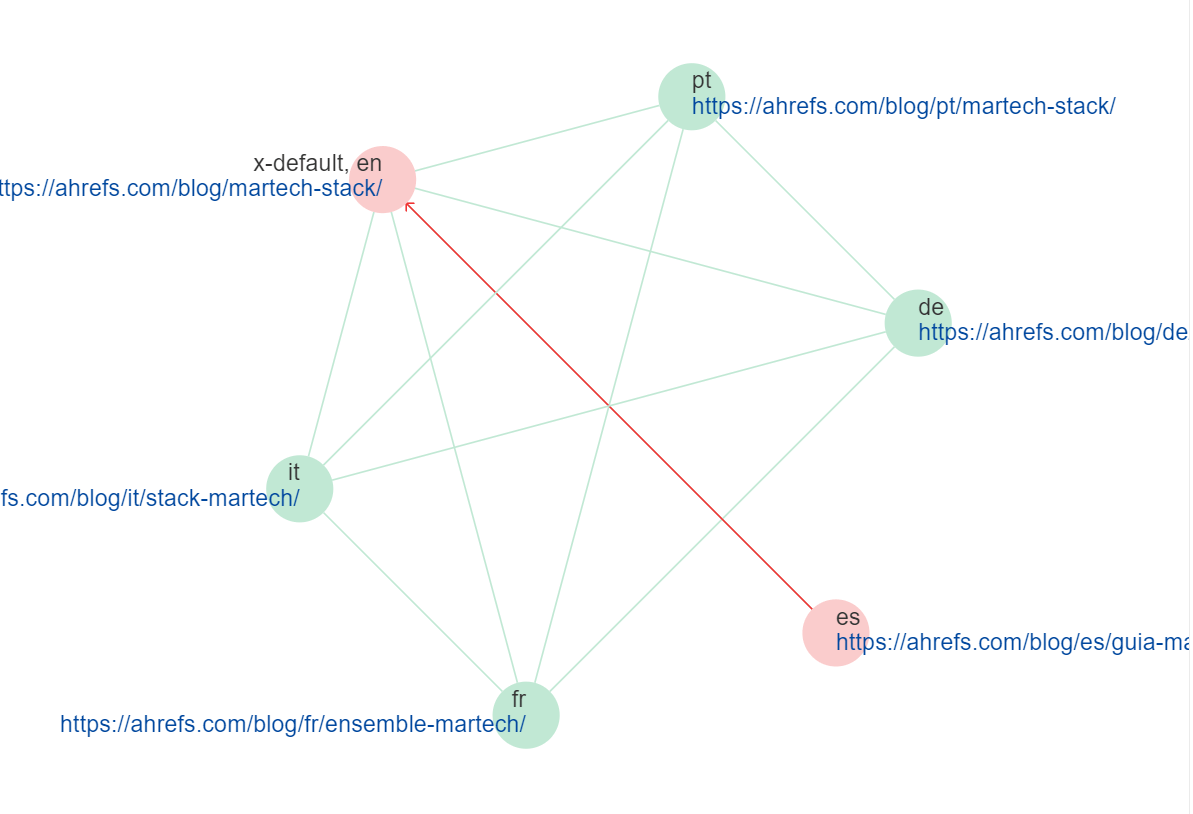
- Translation Lag: In multilingual setups like WPML, if a new language version is live but the content is still in the source language, Google identifies it as a duplicate and may ignore the localized canonical until the unique translation is detected.
Ultimately, a “Duplicate, Google chose different canonical than user” status indicates a lack of structural clarity that can dilute your ranking signals and waste resources. By ensuring that your canonical tags, internal links, and sitemaps are perfectly synchronized, you provide the “perfect alignment” necessary for Google to trust your preferences and maintain your store’s visibility in search results.
How to fix duplicate content issues to increase store revenue?
Resolving duplicate content issues is not just a technical cleanup; it is a critical revenue optimization strategy for WooCommerce stores. When Google encounters duplicate pages and chooses a different canonical than the one you specified, it fragments your ranking signals and dilutes the authority of your high-converting product pages. By ensuring Google indexes only your primary URLs, you consolidate internal link equity and relevance signals, allowing your most authoritative pages to rank higher and capture more high-intent traffic.
- Audit Canonical Implementation: Use tools like Google Search Console to identify where Google is ignoring your tags and ensure your preferred URLs are consistently used in sitemaps and internal linking.
- Consolidate Variations: Use 301 redirects or rel=”canonical” tags to point duplicate product variations—such as those created by size or color filters—back to the main product URL to prevent crawl budget waste.
- Prioritize Localization: If using multiple languages, ensure content is fully translated and hreflang tags are correctly implemented to prevent Google from viewing untranslated pages as duplicates of the original English content.
To protect your store’s ROI, you must shift from a reactive to a proactive indexing strategy. Beyond simple tags, consider utilizing server-side redirects for “bogus” or duplicate URLs and ensuring your sitemap only includes the most authoritative versions of your pages. This technical precision ensures search engines focus their limited crawl budget on the content that actually drives conversions, ultimately protecting your brand equity and long-term profitability.
When should I use 301 redirects for product variations?
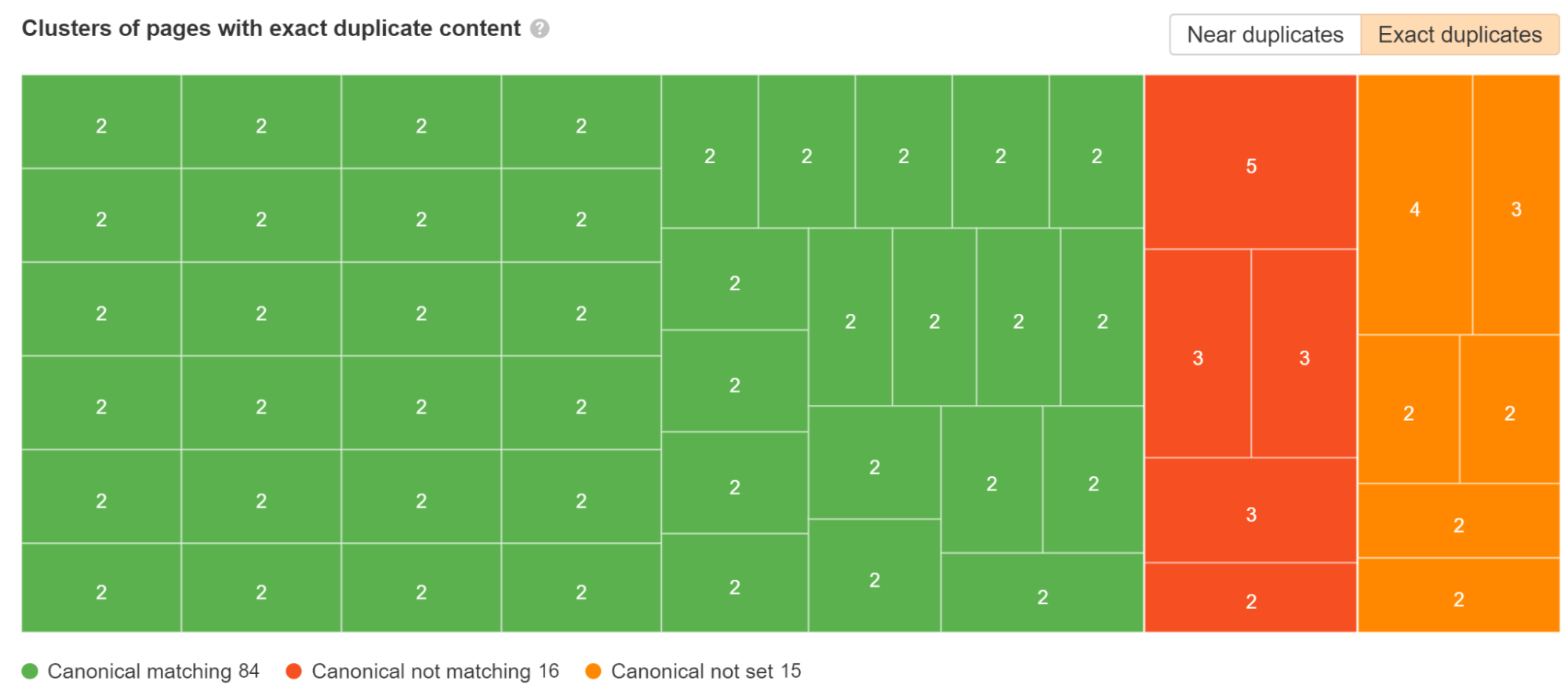
In a WooCommerce environment, deciding between a canonical tag and a 301 redirect for product variations is a critical technical choice that impacts both crawl budget and revenue potential. While canonical tags allow multiple URLs to exist while suggesting a preferred version for indexing, a 301 redirect is a permanent server-side instruction that consolidates all ranking signals and traffic into a single destination. For high-growth stores, redirects are the superior choice when you need to eliminate thin content and ensure that search engines do not waste resources crawling near-identical pages that offer no unique value to the shopper.
To maximize your store’s authority and indexing efficiency, prioritize 301 redirects for product variations in the following scenarios:
- Discontinued or Out-of-Stock Variants: When a specific product variation is permanently discontinued, a 301 redirect to the most relevant live successor or the parent category prevents users from hitting a dead end and preserves existing backlink equity.
- Consolidating Ranking Signals: If your store generates unique URLs for every color or size variation but the content is nearly identical, redirecting these to a single authoritative product page prevents “Duplicate, Google chose different canonical than user” errors and concentrates search performance.
- Site Structure Migrations: During a store rebuild or when tidying up dynamic URL structures into cleaner, search-friendly versions, 301 redirects ensure that old indexed links correctly pass their value to the new permanent locations without disrupting the customer journey.
Implementing a strategic redirect engine is not just about technical housekeeping; it is a fundamental growth tactic. By using 301 redirects instead of simply “hiding” pages, you signal to Google that the move is permanent, allowing the search engine to replace the old URL in its index with the new, optimized version, thereby protecting your brand authority and maximizing Customer Lifetime Value.
How to automate WooCommerce content updates for better indexing?
Automating WooCommerce content updates is a critical technical maneuver for high-growth stores facing indexing delays, particularly when localized content remains untranslated and triggers duplicate content errors. By shifting from manual entry to programmatic updates, you ensure that every product variation and category page maintains a unique, high-quality signal for Google’s crawlers, preventing the “Duplicate, Google chose different canonical than user” status from stalling your organic reach.
- Automated Translation Integration: Use professional plugins like WPML or Weglot to automate the translation of product descriptions and metadata, ensuring that language-specific URLs and hreflang tags are generated instantly to differentiate localized pages.
- Programmatic SEO Audits: Deploy automated crawlers to scan for thin content or filter-driven URL leaks, allowing you to programmatically apply noindex tags or consolidate variations via canonicals before they impact your site’s authority.
- Dynamic Metadata Generation: Implement AI-assisted workflows to automatically generate unique titles and meta descriptions for bulk product uploads, reducing the risk of keyword cannibalization across similar product lines.
To maximize ROI, prioritize the automation of your most significant conversion leaks, such as untranslated category descriptions or unoptimized faceted navigation pages. This technical resilience allows your store to scale its indexable footprint without the bottleneck of manual oversight, ensuring your brand captures revenue at the exact moment of peak customer intent.
Ready to take your e-commerce to the next level?
While resolving a “Google chose different canonical than user” error is a critical technical fix, the business reality for high-growth WooCommerce brands is that indexing errors are often symptomatic of deeper structural inefficiencies that stall revenue expansion. If your search visibility feels like it is hitting a silent ceiling despite your content efforts, or if you suspect that duplicate URL structures are diluting your brand authority and eroding Customer Lifetime Value (LTV), you are facing a technical bottleneck that impacts your bottom line. Relying on automated platform defaults without a precise canonical strategy is not just an SEO oversight; it is a direct compromise of your store’s ability to capture high-intent traffic at the peak of the customer journey.
To move beyond surface-level fixes and build a scalable, high-performance eCommerce engine, you need a partner that treats technical health as a primary driver of profitability. We act as a strategic extension of your in-house team, helping DTC brands maximize Profit, Retention, and LTV through data-driven systems where CRM, performance marketing, and advanced tracking operate in perfect concert. Our process begins with rigorous, conversion-focused audits to eliminate guesswork and identify the exact technical obstacles holding back your ROAS. If you are ready to transition from reactive troubleshooting to a proactive system designed for long-term growth, book a free consultation today.

Comments