


The gap between a casual social media scroll and a confirmed eCommerce conversion is bridged by a layer of invisible data that most brands fail to fully leverage. While standard analytics provide a snapshot of what happened on your site, social media cookies offer the context of who your customers are across the digital ecosystem. For high-growth brands, these trackers are not just technical background noise; they are the primary engine for cross-channel attribution and high-intent audience modeling.
Ignoring the strategic implementation of these third-party tools creates a structural blind spot that directly erodes advertising ROI and customer retention. As privacy regulations tighten, the ability to ethically and effectively deploy social tracking becomes a significant competitive advantage. This guide examines how these specialized data files function within a modern WooCommerce infrastructure, providing the necessary insights to transform passive social interactions into a measurable, scalable revenue driver.
What are social media cookies and how do they work?
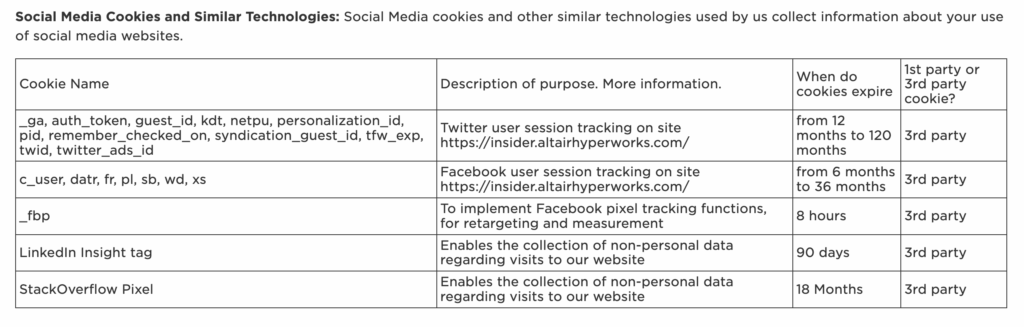
Social media cookies are specialized third-party tracking files deployed by platforms like Meta, LinkedIn, and Pinterest to monitor user behavior beyond their own internal ecosystems. For a WooCommerce store, these cookies are typically introduced via embedded social widgets, such as “Share” buttons or login integrations, as well as through tracking pixels. Unlike first-party cookies that manage local session states or shopping cart contents, social media cookies create a persistent link between a visitor’s browsing activity on your storefront and their established social media profile.
- Script Execution: When a customer loads a product page, scripts from the social platform automatically execute, dropping a unique identifier into the browser cache.
- Cross-Site Correlation: As the user navigates other websites or the social platform itself, the cookie identifies their browser, allowing the platform to map a detailed journey of customer interests and purchase intent.
- Data Synthesis: The collected data is sent to the social provider’s servers to refine audience segments, power retargeting algorithms, and attribute sales back to specific social advertising campaigns.
From a growth perspective, these cookies are the engine behind high-ROI retargeting and “lookalike” audience generation. However, because they track personal data across domains, they trigger strict regulatory requirements under GDPR and the ePrivacy Directive. For WooCommerce merchants, this means that while these cookies are essential for scaling ad spend and recovering abandoned carts, they must be managed through a transparent consent framework that blocks script execution until the user provides explicit, informed permission via a cookie banner.
Why does my WooCommerce store need social media tracking?
For WooCommerce merchants, social media tracking is the bridge between anonymous browsing and high-intent customer acquisition. Without these data points, your store operates in a vacuum, unable to identify which social platforms are driving high-value traffic or where potential customers are dropping off in the funnel. By implementing social media cookies, you transform passive interactions like “likes” into actionable business intelligence that allows for precise cross-channel optimization.
- Retargeting Precision: Tracking allows you to serve dynamic ads to users who viewed specific WooCommerce product categories, significantly reducing abandoned cart rates.
- Attribution Accuracy: It clarifies the customer journey by identifying which social touchpoints contributed to a sale, ensuring your marketing budget is allocated to the most profitable channels.
- Audience Insight: Detailed demographic and behavioral data helps refine your product development and content strategy to better align with your actual customer base.
In the post-iOS 14.5 era, relying on basic platform reporting often results in a 30-50% loss in attribution visibility. Implementing robust social media tracking on your WooCommerce site is no longer optional for scaling; it is a technical requirement to maintain competitive ad performance and ensure your store’s growth is driven by data rather than guesswork.
How to use social media cookies for personalized ad targeting?
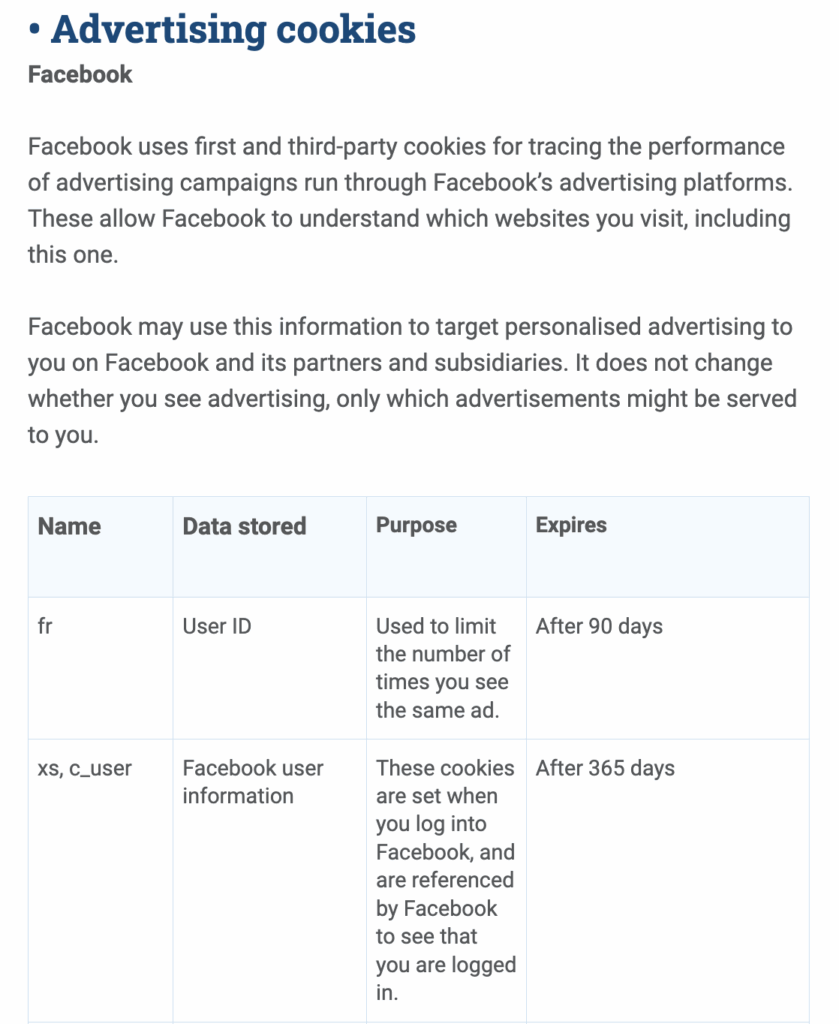
Leveraging social media cookies for personalized ad targeting requires moving beyond simple page-view tracking to capture granular, high-intent behavioral events within your WooCommerce funnel. By integrating platform-specific pixels, such as the Meta Pixel or LinkedIn Insight Tag, your store communicates real-time data back to social platforms, allowing them to map user identities to specific on-site actions. This synchronization enables the transition from broad demographic targeting to intent-based precision, ensuring your ad spend is directed toward users who have already demonstrated interest in your product catalog.
- Dynamic Product Remarketing: Use cookies to automatically serve ads featuring the exact items a user viewed or abandoned in their WooCommerce cart, significantly increasing the likelihood of recovery and purchase.
- Lookalike Audience Generation: Utilize the conversion data harvested by these cookies to build “seed” audiences, allowing social algorithms to identify and target new users who share the behavioral characteristics of your highest-value customers.
- Conversion Optimization: Pass specific event data like “Purchase” or “Complete Registration” back to the ad platform to train its machine learning model to bid more aggressively for users likely to perform those specific actions.
To maintain targeting efficacy as third-party cookies face increasing browser restrictions, high-growth brands must transition to a hybrid tracking model. This involves pairing standard client-side cookies with server-side solutions like the Meta Conversions API (CAPI). By sending event data directly from your WooCommerce server to the social platform, you bypass browser-level blocks and ensure a more resilient, first-party data stream that protects your attribution accuracy and long-term ROAS.
When do social media cookies collect customer data?
Social media cookies begin their data collection process the moment a user interacts with any element on your WooCommerce site that is connected to a social platform’s infrastructure. These trackers do not require a direct click on a “Share” button to initiate; instead, they often load as soon as a page containing embedded scripts—such as a Facebook Pixel or a LinkedIn Insight Tag—is rendered in the browser. For high-growth eCommerce brands, understanding these triggers is vital for maintaining both data accuracy and regulatory compliance.
- Passive Page Loading: Cookies are often dropped as soon as the browser executes the third-party JavaScript required to display social widgets or tracking pixels, even if the user never interacts with the visual elements.
- Active Feature Interaction: Data collection intensifies when a customer utilizes social login options, clicks a “Like” or “Pin it” button, or leaves a comment via a social media plugin, linking their store behavior to their social profile.
- Cross-Domain Referral: If a customer arrives at your store via a social media advertisement, existing cookies on their device immediately sync with your site’s trackers to attribute the session and monitor subsequent purchase intent.
From a technical standpoint, these cookies often persist across multiple sessions, allowing social platforms to build a continuous behavioral profile of your customers. For a WooCommerce merchant, this means that data collection occurs throughout the entire customer journey—from the initial landing page visit to the final checkout confirmation. Properly managing the timing of these scripts through a consent management platform is essential to ensure that data is only harvested after the user has been adequately informed and has provided valid consent.
How to optimize social media cookies for eCommerce revenue growth?
Optimizing social media cookies for WooCommerce requires moving beyond basic implementation toward a strategic first-party data framework. For high-growth brands, the primary objective is to bridge the gap between social engagement and backend conversion data, ensuring that your ad spend is allocated toward high-intent audiences rather than generic traffic spikes. By refining how these trackers interact with your store’s checkout flow, you can significantly improve return on ad spend (ROAS) and customer lifetime value.
To maximize revenue growth through social tracking, prioritize the following technical optimizations:
- Server-Side Tagging: Transition from client-side pixels to server-side tracking to bypass browser restrictions like Intelligent Tracking Prevention (ITP) and ensure more accurate conversion attribution.
- Advanced Matching: Enable automatic advanced matching to send hashed customer data (like email or phone numbers) back to social platforms, increasing the accuracy of your retargeting pools and lookalike audiences.
- Event Deduplication: Implement a robust deduplication logic between your browser-based pixels and the Facebook Conversions API (CAPI) to prevent overreporting while maintaining a resilient data stream during network errors.
Ultimately, a well-optimized cookie strategy serves as the foundation for sophisticated behavioral triggers. By capturing granular interaction data—such as specific product categories viewed or abandoned cart values—you can deliver hyper-personalized social ads that meet the customer at their exact stage in the purchase journey, effectively turning passive likes into measurable revenue.

Ready to take your e-commerce to the next level?
While understanding the mechanics of social media cookies is a technical necessity, the business reality for high-growth WooCommerce brands is that data collection without a cohesive strategy is a recipe for wasted ad spend and stagnant LTV. If your performance marketing efforts feel like they are stalling revenue expansion, or if you suspect that your tracking setup is providing incomplete insights into your customer’s true journey, you are facing a structural barrier to scale. Relying on basic pixel implementations or unoptimized social tracking is no longer just a technical oversight; it is a direct compromise of your ability to target high-value customers and capture revenue at the exact moment of peak intent.
To move beyond simple data capture and build a high-performance growth engine, you need a partner that synchronizes your technical tracking with your broader business objectives. We act as a strategic extension of your team, helping DTC brands maximize Profit, Retention, and LTV through data-driven systems where tracking, consent, CRM, and paid media operate in perfect concert. Our process begins with rigorous, conversion-focused audits to eliminate guesswork and identify the precise bottlenecks in your attribution and lifecycle flows. If you are ready to transition from fragmented data to a scalable, privacy-compliant system that maximizes ROAS, book a free marketing automation audit today.


Comments